
Visual Expert Release History
Shared Documents & Views in VE Web
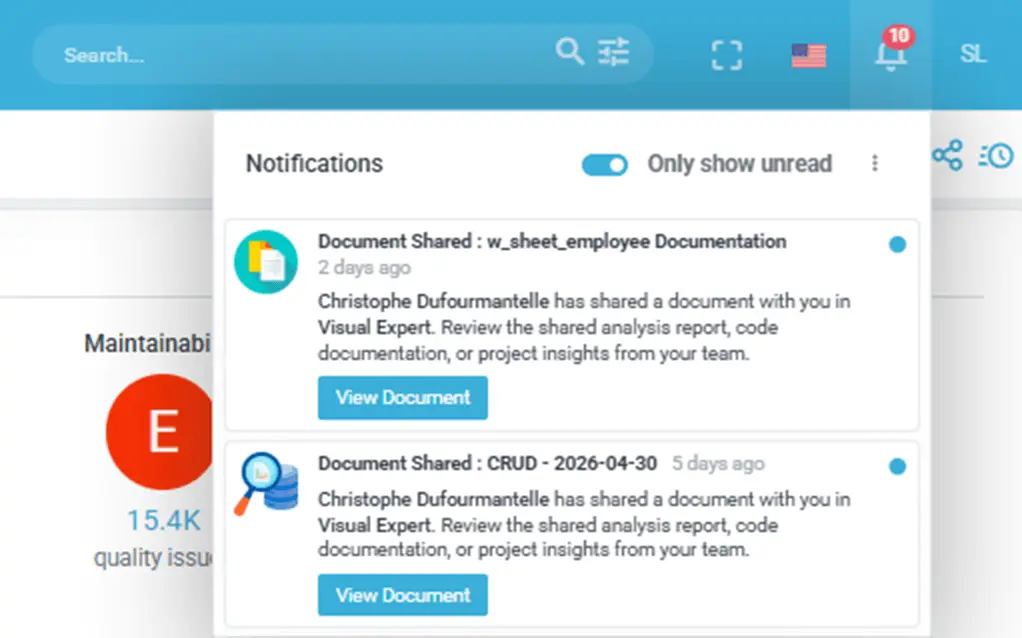
A new module is now available in VE Web, enabling teams to save, share, and collaborate on code analysis results directly from their browser.

- Share Analysis Results & Views
Share Code Explorer views, CRUD matrices, Code Inspection results, AI reports, and documentation snapshots with your team via a unique URL. Duplicate detection prevents redundant shares for the same content. - Shared Documents Hub
A central dashboard to browse, search, and manage all shared documents. Documents are organized by project, owner, favorites, and trash, with search, view count, and tooltips. - Access Control & Permissions
Per-user and per-group access levels (read, edit, owner) on shared documents. When access is denied, a dedicated page guides the user to contact the document owner instead of displaying a blank screen.
Notification Service
A complete notification infrastructure is now available across VE Web and VE Desktop, powered by a dedicated service endpoint.
- Event coverage
Alerts are triggered by project events, analysis completions, user registration and lifecycle changes, shared content activity, password changes, and system reliability incidents. Notifications are delivered both by email and directly within the VE interface. - Configuration UI
Notification settings are configurable from both VE Web (My Account > Settings) and VE Desktop, with a dedicated notification settings panel in each interface. - Background processing
The notification engine runs as a background service in both the Windows Service and VE Web, ensuring alerts are delivered without interrupting user workflows.
Documentation Dashboard
The Documentation Dashboard in VE Web has been redesigned. The accordion layout has been replaced by interactive treemaps, giving a navigable visual overview of your project's documentation structure.
- Schema treemaps with hyperlinks to individual objects and total values
- Optimized tile layout with improved tooltips and direct links to each object

Macros
- Schema-Level Dependencies (Callers & Called)
Two new macros that analyze dependencies at the database schema level, providing a high-level view of how schemas interact with each other. Particularly useful for large projects involving multiple databases.
Migration to .NET 10
- Visual Expert Engine, VE Web, and VE Desktop are being migrated to .NET 10, reducing the duration of the code analysis phase, bringing better security, and long-term support. Legacy binary serialization has been replaced with a modern JSON-based storage format.
PowerBuilder 2025 Support
- VE Projects can be created and analyzed using PB 2025 source code.
- Code Inspection rules updated for improved deprecated syntax detection and migration readiness.
Improvements
- License end date — now displayed in both Desktop and Web interfaces.
- Forgot Password — users can now reset their password directly from the VE Web login screen.
- SMTP Configuration — available in both VE Web and VE Desktop, with improved defaults and a test connection button.
- User session management — administrators can disconnect active users directly from the VE Web interface (Active Users and Waiting Room views).
Security Improvements
- SQL Injection protections — additional protections applied, including handling of hierarchy ID edge cases.
- TLS/SSL hardening — insecure protocol versions removed from the VE Web configuration.
- Access control — exposure of sensitive services mitigated; access control management reinforced across VE Web.
- Session cookies — VE Web now detects whether the request is served over HTTP or HTTPS, allowing development and test environments to function correctly while maintaining strict cookie policies (HttpOnly, SameSite, Secure) in production.
- Password Policy — configurable password strength rules, allowing administrators to enforce minimum complexity standards across all VE Web user accounts. (Coming next release)
Bug Fixes
- Fixed issues with favorites not updating immediately after marking or unmarking a document.
- Eliminated duplicate entries in project name lists and shared-users popups.
- Corrected date display in Recent Files when projects, analyses, or users were deleted.
- Fixed blank pages when opening shared documents after the corresponding project was deleted, or when accessing shared views for the first time.
- Standardized "Open in new tab" behavior across shared pages for consistent navigation.
- Fixed an issue where loading a shared view caused VE to incorrectly open the License & Product Information screen on restart.
- Fixed empty tab when rapidly clicking CRUD Matrix links in VE Web
- SMTP test connection now correctly validates the email address before sending
- Fixed "undefined internal error" when right-clicking on blank space in the CRUD Matrix
- Fixed installation issues on fresh machines — setup and first project creation now complete without errors.
Visual Expert Web - GA
Visual Expert Web evolves into a comprehensive web platform, offering developers, database administrators, and project managers powerful tools for code analysis, project management, and team collaboration. This release transforms the browser-based interface into a mature solution with enhanced features and improved user experience.
Visual Expert Web Workspaces


Code Analysis Tools
- Interactive CRUD Matrix with contextual tooltips
Visualize and analyze all database operations across your applications with an interactive matrix view.

- Interactive Object Dependency Matrix
Map and explore relationships between components to understand code dependencies.
- Source Code Navigation History
Navigate through your code with forward/backward navigation and keep track of your analysis path.
Advanced User Management
- Unified Access Control
Comprehensive permission system including project creation, user management, repository settings, and administrative rights, all managed from a single interface.l

- Waiting room feature for concurrent access management
- Streamlined administration (password reset, user tracking)
Enhanced User Interface
- Guided tours to assist with new user onboarding
- Enhanced Tree View with state preservation
Tree view remembers your navigation state and expanded nodes for a seamless user experience. - Responsive design for all screen sizes
- Multilingual support (English, French, Japanese, Spanish)
New Macros
- Package-Level Dependencies
A new macro to visualize dependencies between database packages, helping teams understand the structure and coupling of their code
Code Inspection
- Security Hardening Rule Group
A new "Security Hardening" category has been added to Code Inspection rules, covering exception handling, dead code elimination, use of deprecated features, and maintainability practices that reduce long-term security risk.
Performance Improvements
- Macro Result Caching
A new two-level caching system (in-memory and file-based) allows macro results to be reused instantly. Macros now run up to 4x faster, especially for repeated queries on large projects. - Oracle Extraction Multi-threading
Oracle source code extraction has been refactored to support multi-threading, resulting in up to 3x faster extraction for large schemas.
Support for PowerBuilder 2025
- Visual Expert now supports PowerBuilder 2025 applications. Projects can be created and analyzed using PB 2025 source code.
Enhancements
- Search into Selected Components (VE Web)
Search scope can now be restricted to selected components in VEWeb, a feature previously available only in VEDesktop. - Performance Metrics Filtering (VE Web)
A new Performance Settings dialog allows users to filter performance metrics by time period (1, 5, 15, 30, 180, or 365 days). - Firefox Support (VE Web)
- Jenkins Plugin
Improved license management (release after each action, sequential execution).
AI-Assisted Code Analysis (Beta)
Visual Expert introduces AI-powered macros to help developers and business analysts understand, document, and improve their code. AI macros can generate code summaries, business-level explanations, comments, optimization suggestions, and propose fixes for Code Inspection issues. Available for PowerBuilder, Oracle PL/SQL, and SQL Server T-SQL code.
Code Inspection
- Generating code inspection reports in JUnit and JSON formats
- Code Inspection Profile to set expectations and pass/fail statuses
- New version of the Jenkins plugin
- New set of rules for migrating to PowerBuilder 2022 and higher
- Updated documentation for Code Inspection rules
Performance Tuning
Cross References
- Added macros for SQL query analysis in PB events and functions.
Performance and Speed Improvements
- Faster execution time for treeview macros
- Reduced duration of code analyses
Full-text searches
Core features
- New licensing system based on lines of code.
- Ability to create projects using PowerBuilder targets in Source Control.
- Improved dialog boxes for connecting to Source Controls.
- Enhanced support for FIPS encryption for connections to both VE Repository and Projects.
Visual Expert Macro Development
- Enhanced CRUD matrix for DataWindows.
- Introduction of a new Macro for the performance-oriented Smart Explorer.
- Added 'Most Defective Items' macro for both the Application and Code Inspection root nodes.
UI/UX
- Optimized layout for enhanced user experience with improved arrow navigation and context menus for tree-view elements.
Bug Fixes
- Resolution of issues with Oracle Performance.
- Fixed the Macro PowerBuilder open IDE issue.
- Resolved issues with the Auto Update functionality.
- Added post-processing display and enhanced PowerServer syntax checks in the parser.
New PowerBuilder Performance Tuning Macro
Visual Expert 2023 includes a new set of features to improve the performance of PowerBuilder code.
- Generate and Consolidate Traces
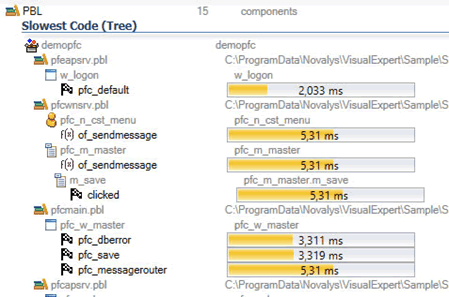
Collect Performance data from multiple user sessions/workstations. - Slowest Code
List the slowest objects and methods in a tree view, regardless of the number of times they are executed in runtime.
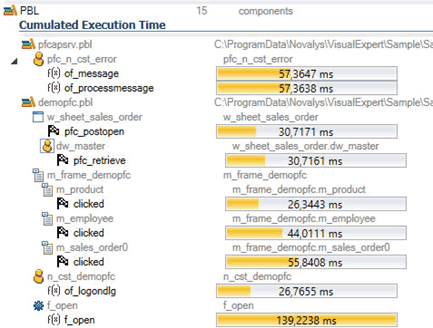
- Cumulated Execution Time
Identify objects and methods affecting performances in relation to their execution frequency :
[Average execution time * number of executions]
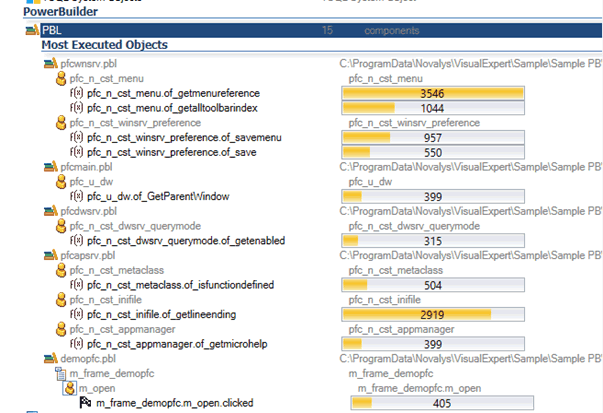
- Most Executed Objects
Find the objects that were most frequently executed during the user sessions traced
Engine migration to .NET 6
- The Visual Expert engine has been migrated to .NET 6.
Code analysis is now 30% faster
Code Inspection
- New inspections rules (List of rules)
- Improved rules
Impact Analysis
- Enhanced Impact Analysis on DataWindows
Support of references between controls and DataWindows, to improve Impact Analysis results.
VE UI Enhancement
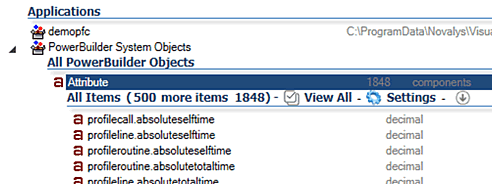
- Enhanced tree view paging
Pagination is now activated by default from 500 results onwards
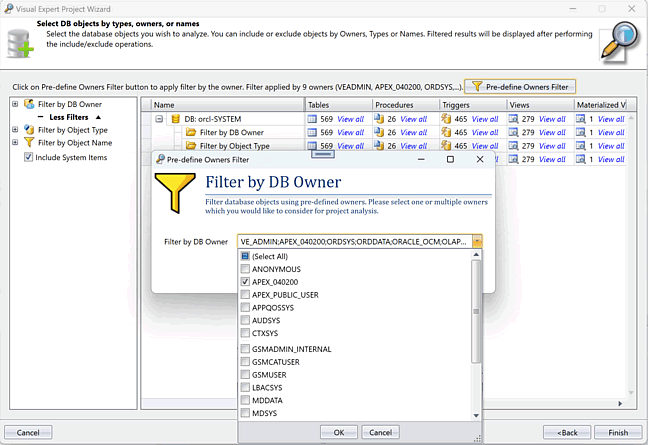
Support of Large Database
- Enhanced support of large Oracle database: a pre-filter can be applied on DB Owners for DB containing more than 500,000 objects. This greatly accelerates the process of filtering DB objects and allows focusing the analysis on a relevant subset.
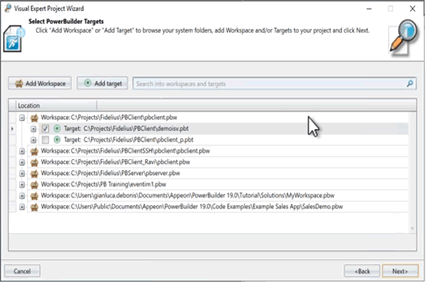
SVN Integration
- Enhanced display of the code taken from SVN to accurately represent the structure of the application
Treeview Paging
- New Paging System to speed up the display of large results in the treeview.
Users can enable it or not, and choose the number of items displayed at once.
Automatic Updates
- This optional feature allows users to download and install updates automatically if they want.
New Treeview Macros
- Get Information table on Table
- Find all system functions
- Naming Consistency
Code Inspection
- New inspections rules (List of rules updated)
- Drilling down with sub-dashboards and lists
- Enhanced tooltips in Dashboard
- Configuring inspection rules
New Sources of Code
- Support for SQL Server Azure
- Support for Oracle Cloud Database
- Support for Oracle 2020c
- Support for ODBC connexion to Oracle
- Support for ODBC connexion to SQL Server
- Support for PowerBuilder 2021
- Support for PowerBuilder PBG files
- Support for AWS CodeCommit (Source Control)
- Support for TFS PB targets (Source Control)
- Windows Authentication for Repository connection
- Windows Authentication for VE Service
- 64 bit Support for Visual Expert Service
VE Project Configuration
- Editing a Database Connection
- Editing a VE project name
- Enhanced filtering of Oracle & SQL Server objects
- Advanced settings for Oracle Code Parsing
- Collaborative: sharing the connection to a VE Repository
VE UI Enhancements
- Expanding/Collapsing Tree View branches
- Searching & Filtering among previous Code Analyses
- Code Review: New “Code Review” tab in the Ribbon menu
- Treeview : enhanced tooltips on errors
- Treeview : enhanced tooltips on 2nd treeview column
Others
- Windows Authentication for Repository connection
- 64 bit Support for Visual Expert Service
Code Inspection Features GA
Visual Expert 2021 officially includes the new code inspection features set to improve the security and quality of your PowerBuilder, Oracle and SQL Server code.
Visual Expert scans your source code to automatically detect security vulnerabilities, bugs and maintainability issues.
- Check your code against 300+ predefined rules
- Precisely locate the code that needs to be fixed in the Visual Expert GUI.
- Generate comprehensive HTML reports
- Visualize key metrics and remediation cost in a dedicated dashboard
- Use the Jenkins Plugin to integrate continuous code inspection in a continuous integration workflow.
Read the following articles to learn how to inspect your code with Visual Expert:
VE UI Enhancement
New Code Analysis features
- Item Names Dictionary: List and sort DB objects by name to check and improve name consistency.
- New Diagram: Call Tree Diagrams, to visualize chains of calls
- New Macro: Find DLL functions called from PowerBuilder
- New Macro: Most Referenced Objects and Tables
- New Macro: Largest Tables (per number of records)
- New Macro: Most frequently executed procedures
- New Macro: List the views based on a given table
- VE Project: Analyze several databases at the same time
- DB parsers: New options to filter DB Objects - include or exclude
- DB parsers: Filter DB objects by Name
- PB Parser: Support for RESTClient objects
- PB Parser: Support for HTTPClient objects
New UI features
- Source Code view: you can now export the script or object displayed
- Ribbon Menu: New tab page “Cross References”
- New dashboard to guide users a startup (when no project is opened)
- Guided Tour: interactive animation to introduce VE to beginners
- Source code view: you can now Zoom in / Zoom out to adjust the size of the code
New Integration Features
- Support for GIT: analyze code hosted in a GIT repository
- Support for SVN: analyze code hosted in a SVN repository
- Ability to execute a script/command line before or after a code analysis
- Ability to execute a script/command line before or after generating a documentation
Enhancements
- CRUD Matrix: support for synonyms, now listed in the columns of the CRUD matrix like tables. User can visualize references to each object separately (table or synonym).
- VE Sample Projects: now add DB synonyms examples
- Code Review Report: now includes Naming Convention verification
- Source Code view: when printing a script, its path is now included
- Source Code view: tooltips now show the path of the procedures referenced
- Ribbon Menu: tooltips added for all Ribbon controls
- Connection to Oracle: connection settings improved
- System Resources: if Video RAM is too low, a warning is now displayed
Visual Expert 2019 R2
New Features
- New Macro: Most Used Tables
- New macro: "Synonym" finds all the synonyms of a table
- CRUD Matrix: Generate a CRUD matrix from a selection of procedures
- Run Visual Expert in Command Line
- Open Project: New Search field to find a project in a long list
- Support for PB 2019 Applications
- New "maintenance" tab in the Settings Window.
Enhancements
- Macro "All tables": Filter tables by type
- Macro "Web Service called": calls to Web service now highlighted in PowerBuilder code
- Tooltips added for each controls of the treeview and source code toolbars
Visual Expert 2019
New Feature Set: Generate diagrams from your code
Visual Expert 2019 introduces a new feature set to visualize the design of your application with diagrams.
They are automatically generated in the UI, and synchronized with the code, to combine design-level and code-level visualization.
Several models available from the start, additional ones will come step by step:
- Object Dependencies Diagram for PowerBuilder (Impact analysis)
- Object Dependencies Diagram for Oracle PL/SQL (Impact analysis)
- Object Dependencies Diagram for SQL Server Transact-SQL (Impact analysis)
- PBL dependencies
- Data modeling for Oracle Databases
- Data modeling for SQL Server Databases
A Diagram Editor is automatically installed with VE to Edit, Export and Share the diagrams generated by Visual Expert.
New feature set: Code Performance Analysis
- Identify the slowest procedures or functions
- Break-down the execution time of a procedure to pinpoint issues
- Find the slowest SQLs in your code
- Get the execution plan of a SQL query (for Oracle) (for SQL Server)
- Analyze the performance of a chain of objects calling each others
- Drill-down from object, to query and code-level
Code Review
- New Code Review HTML Report. This report checks some development rules for SQL Server, Oracle and PowerBuilder applications, and lists the encountered issues in an html document.
- New macro to check naming conventions for SQL Server code.
Source Code Documentation
- New HTML5 Responsive Template
Open your source code documentation on any device with a renewed design.
Enhancements
- Improved treeview response for large volumes of code
- New setting to select a specific parser for DB code embedded in PowerBuilder
- Automatic shrink of the Repository database when unused space exceeds 20%
- Dynamic references to datawindows now highlighted in the code
- Stored Proc called: references to procedures highlighted in PowerBuilder code
- Shared datawindow: improvements to visualize shared DW dependencies
- Updated Oracle Connection screen and added SID field.
- Added wait indicator on open/close and other VE events.
Visual Expert 2018 R2
- Treeview: Analyze calls to web services from PowerBuilder Code.
- Code Comparison: VE 2017 introduced the possibility to compare 2 versions (analyses) of the same code. VE 2018 adds the possibility to compare 2 independent sets of code, like 2 versions of your applications, or 2 databases (dev DB and prod DB for example).
- Response time optimization of the VE treeview: Several improvements speed up treeview manipulations, to better handle large volumes of code.
- Treeview: New presentation for macro execution.
- [Beta] Code Performance Analysis: Visual Expert 2018 r2 includes a new set of features to identify slow pieces of database code (Oracle and SQL Server).
Contact us to configure and test these features. - UI: Customizable Quick Access Toolbar
Visual Expert 2018 R1
Support for Team Foundation Server (TFS)
Visual Expert for SQL Server (GA)
Visual Expert 2017 introduced a beta version of our SQL Server Code analyzers (see this post). The official version (GA) is now available with Visual Expert 2018.
Other features
- Treeview: Compare references to an object, between 2 versions of your code
Code Comparison
- Save “snapshots” of your code on a regular basis, and compare them anytime.
- Run Comparison across both PowerBuilder and Database Code
- Explore differences in a container hierarchy. Drill down to find relevant changes.
- Filter changes for a given PBL, object, object type.
- And more...
CRUD Matrix
Shows which program is accessing which data, and how (Create/Read/update/delete)
This feature scans all your Datawindows, PowerScript, Stored Procedures, views, etc.
Read more
New Code Analyzer for SQL Server (BETA VERSION)
- Analyze T-SQL Code and SQL Server Schema: procedures, triggers, tables, views...
- Combine SQL Server and PB code Analysis to cover the entire application.
- Review and maintain dependencies between Client and Server Code.
- Navigate seamlessly between each language,
for instance when a PB Script is referencing a SQL Server Procedure.
Other features
- Renovated Interface with Ribbon Menu and additional features
- New version of the Oracle and PL/SQL Code Analyzer
- New Doc Generator, supporting much larger sets of code.
- New feature to generate partial documentation, for instance on a given PBL, or a selection of objects.
- New Database section in the PB documentation, listing tables, columns and procedures used by the PB code,
- New macros for improving performances. For instance for detecting missing indexes degrading response times.
- Code documentation: generate your documentation up to 10x faster!
- Code Review: check naming convention and identify objects, methods and variables with improper names.
- UI: new information page
- Settings: new settings to locate, and better integrate with PB IDEs.
New Features Visual Expert for Oracle
- Treeview: SQL Performances - Columns with missing Index
- Treeview: Code Review - Calculating the number of Lines of PL/SQL Code
- Treeview: Code Review - Counting PL/SQL Items by type
- Treeview: SQL Performances - Tables with missing Primary Key
- Treeview: SQL Performances - Unused Indexes
- Treeview: Code Review - Find Uncommented PL/SQL scripts
- Treeview: Code Review - Large PL/SQL scripts
- Treeview: Code Review - Find empty PL/SQL functions/procedures
- Treeview: Code Review - Find duplicated functions/procedures
New Features Visual Expert for PowerBuilder
- Treeview: Find calls to tables & columns by access type (Select/Insert/Update/Delete)
- Treeview: Find PowerBuilder NVOs declared as instance variables
- Treeview: Exploring DW DataSources (Retrieve SQL, Updated Table, Stored Procedures Called...)
- Treeview: Showing Datawindows Updatable Columns
- Treeview: Filter DataWindows by DataSource type
- Treeview: Code Review - Calculating the Lines of Code in your application
- Treeview: Code Review - Counting Items by type in your applications (Oracle & PowerBuilder)
- Treeview: Code Review - Finding Unnamed PowerBuilder Controls
- Treeview: Code Review - Finding Uncommented scripts (Oracle & PowerBuilder)
- Treeview: Code Review - Non inherited PowerBuilder Objects
- Treeview: Code Review - Large scripts (Oracle & PowerBuilder)
- Treeview: Code Review - Finding empty methods/functions (Oracle & PowerBuilder)
- VE GUI: Expand/Collapse blocks of code in the Source Code View
- Document Generation: Choose the language (EN, JP, SP, FR) of the documentation
Improvements
- Treeview feature/PB: Finding "Unused" items now extended to PBL Root and PB Application level
- Treeview feature/PB: "Overrides" (methods replacing ancestor scripts) now extended to PBLs and Application level
- Impact Analysis now indicates the type of access to tables & columns (Select/Insert/Update/Delete)
- VE GUI: New indicator on tables & columns (red spot) when their declaration is included in the project
- VE GUI: Selecting a table or column in the treeview now highlights their declaration in the code
Visual Expert 2015 is end-of-life. Learn more
New Features
- Treeview feature/PB: List Computed Fields of selected Datawindows
- Treeview feature/PB: PBL level dependencies (External References / PBL dependencies)
- Treeview feature/PB: Large PBLs (Code Review)
- Treeview feature/PB: Find all the Dll functions declared in a PowerBuilder application
- Source Code Documentation: Home page, objects lists, new sections and hyperlinks added
- VE GUI: Macro parameters can be saved and applied automatically next time
- VE Project management: Review the history of code analyses
- VE Project management: Delete past code analyses to free up disk space
- VE Project management: Access Control features, secure VE projects shared between teammates
- New Macros: Empty Methods
- New Macros: Object Metrics
- New Macros: Functions Metrics Summary
- New Macros: Retrieve SQL
- New Macro - DW Exploration - Retrieve Arguments (5.7), Controls containing (5.7) Compute Fields
Improvements
- Treeview feature/PB: DataWindow retrieve arguments
- Treeview feature/PB: Controls containing the selected Datawindow(s)
- Treeview feature/PB: "Last updated" has new parameters - 'end date', 'start date' and 'number of items'
- VE Project management: Send log to technical support with no internet connection
- VE Project management: Task Scheduler now accepts manual dates. "Today" button added in date picker.
- VE GUI: New toolbar button (Home) to reset main view
- Treeview feature: Autocomplete in Main View search
- VE Project Management: Select where your temporary files are stored
- VE Project Management: New SQL Server instance for Visual Expert project storage - LocalDB
- VE Project Management: System Tray Notification: follow the progress of your scheduled analyses and documentation generation.
Visual Expert 7.x versions are end-of-life. Learn more
New Features
- New architecture introduced with Visual Expert 7
- VE Project management: Optimize code analysis performances
- VE Project management: Define Internet proxy settings
- VE Project management: Manage your Hard Drive space
- VE Project management: Multiple applications project - define application dependencies
- PowerBuilder 12.6 is now supported
- Support for Windows 8
- VE Project management: Support for multiple users and collaborative features
- VE Project management: Setup & forget - let code analyses run automatically in the background
- Source Code Documentation: new customizable documentation Templates
- Treeview feature/PB: new feature set (macros) to explore Powerbuilder code
- VE GUI: Global Search - more options to refine your search results
- VE GUI: New Address Bar in the source code View
- VE GUI: Docking System - Rearrange Visual Expert views as you like
Visual Expert 5.x versions are end-of-life. Learn more
- Visual Expert 5.7 Build 80122 for VB, PB, PL/SQL and Transact-SQL
- Visual Expert 5.7 Build 70410 for VB, PB, PL/SQL and Transact-SQL
- Visual Expert 5.7 Build 70227 for VB, PB, PL/SQL and Transact-SQL
- Visual Expert 5.7 Build 70117 New Major release for PB, PL/SQL and Transact SQL
- Visual Expert 5.6 Build 60711 for VB, PB and PL/SQL
- Visual Expert 5.6 Build 60412 New Major release for VB, PB and PL/SQL
- Visual Expert 5.5 Build 50711 for VB and PB
- Visual Expert 5.5 Build 41116 for VB and PB
- Visual Expert 5.5 Build 41105 New Major release for VB and PB
- Visual Expert 5.0 build 40423 for PowerBuilder
- Visual Expert 5.0 build 40423 for Visual Basic
- Visual Expert 5.0 build 40226 for PowerBuilder
- Visual Expert 5.0 build 40226 for Visual Basic
- Visual Expert 5.0 build 31112 for PowerBuilder
- Visual Expert 5.0 build 31112 for Visual Basic
- Visual Expert 5.0 Build 30704 for Visual Basic
- Visual Expert 5.0 Build 30704 for PowerBuilder
- Visual Expert 5.0 Build 30124 New Major release for VB and PB