
Schema-Level Dependency Analysis
Visual Expert provides two macros to analyze dependencies at the schema level in Oracle and SQL Server projects. Rather than examining individual objects in isolation, these macros give you a consolidated view of how schemas interact with each other - which schemas call into a given schema, and which objects a schema depends on externally.
This is particularly useful for large projects involving multiple databases or schemas, where understanding cross-schema coupling is critical before any refactoring, migration, or impact analysis.
Overview
The two macros available for schema-level dependency analysis are:
- Dependencies to Other Schemas - identifies objects in the selected schema(s) that reference objects located in other schemas (outbound dependencies).
- Dependencies from Other Schemas - identifies objects in other schemas that call into the selected schema(s) (inbound dependencies).
Both macros are available for Oracle projects (PL/SQL section) and SQL Server projects (Transact-SQL section).
How to Access the Macros
Both macros are accessible from the same location in the Visual Expert main view:
- Navigate to the PL/SQL section (Oracle) or Transact-SQL section (SQL Server)
- Select [Schemas]
- In the navigation bar, under Code Documentation, click [All Schemas]
- In the main view, select one or more schemas
- Under Cross-References, click [Dependencies to other schemas] or [Dependencies from other schemas]
Macro: Dependencies to Other Schemas
This macro identifies all objects belonging to the selected schema(s) that are referencing objects located in other schemas. It maps outbound dependencies — showing what the selected schema consumes from the rest of the project.
Use this macro to:
- Detect which objects in other schemas are exposed to and consumed by the selected schemas.
- Assess the impact of modifying or removing shared objects in dependent schemas.
- Support architectural reviews in multi-schema environments by understanding what external objects a schema relies upon.
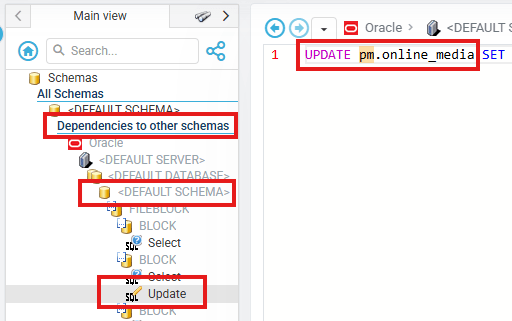
Macro: Dependencies from Other Schemas
This macro maps all inbound dependencies — identifying which objects from other schemas are calling objects within the selected schema(s). It provides a complete picture of who relies on the selected schema.
Use this macro to:
- Understand which external schemas rely upon a given schema before restructuring or migration
- Identify cross-schema coupling that could be affected by renaming, moving, or removing objects
- Build a complete picture of schema-level data and logic flow across the entire project
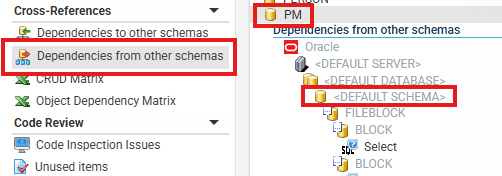
When to Use These Macros
- Before a migration — Identify all cross-schema dependencies to plan the migration sequence and avoid broken references.
- Before refactoring — Check which other schemas would be affected by changes to a given schema's objects.
- Impact analysis — Understand the downstream and upstream reach of a schema before modifying shared procedures, tables, or views.
- Architecture reviews — Get a high-level map of schema coupling across large multi-database projects.
Notes
- Both macros operate on the schemas selected in the main view. You can select multiple schemas to produce a combined dependency view.
- Results reflect the last completed analysis. Re-run the project analysis if recent code changes need to be included.
- These macros are available for Oracle (PL/SQL) and SQL Server (Transact-SQL) projects only. They do not apply to PowerBuilder projects.