The generator has been improved to produce the documentation must faster. It now includes a cache system that drastically reduces the number of queries sent to the Visual Expert to collect data about your code, before generating HTML pages. The larger the volume of code, the more important the acceleration to produce the documentation.
Visual Expert Articles Published in 2017
Visual Expert Information Pages | Documentation
This page has been recently extended, and is now replacing the page [Help-About] that was included in previous versions of Visual Expert.
Integration with PowerBuilder - New settings
New settings have been added to help Integrate with your favorite version(s) of PowerBuilder. This article introduces these settings, and recaps the key PowerBuilder integration features.
Support for PowerBuilder 2017
Visual Expert now supports PowerBuilder 2017. Learn how to include PB 2017 code in a Visual Expert Project, and how to edit PB 2017 objects or methods from VE.
[Tutorial] Check the Quality of your Code Analysis
With large / complex code, it is possible that Visual Expert code analyzers raise warnings or errors. This article explains how to detect and address analysis issues so that you code is 100% covered.
VE for SQL Server - Beta2 Available
A new version of Visual Expert for SQL Server is now available.
9 Must See Features to Migrate your PowerBuilder Application
Whether you're moving to PB 2017, upgrading your database, going mobile or migrating to 64-bit, it's always a challenge to rework large and complex applications. This article introduces tools coming with Visual Expert, and simplifying your migration.
Manage and Explore Different Versions of your Code
This article describes how to create snapshots of your code, to explore and manage previous versions of your application.
Visual Expert at Elevate 2017 - Charlotte PowerBuilder Conference
Join the conference and attend the Visual Expert session.
Code Documentation Generator for SQL Server (Transact SQL)
A new documentation template is now available with VE for SQL Server.
Optimizing the Space Consumed by Visual Expert
Optimize the space used by Visual Expert on your drive and in you database. Ensure complete and faster analysis of your code. Save teammates time and resources.
New Database Section in the PowerBuilder Documentation
Visual Expert 2017 includes a new "Database" section in the PowerBuilder documentation, even for projects that do not include Oracle or SQL Server code.
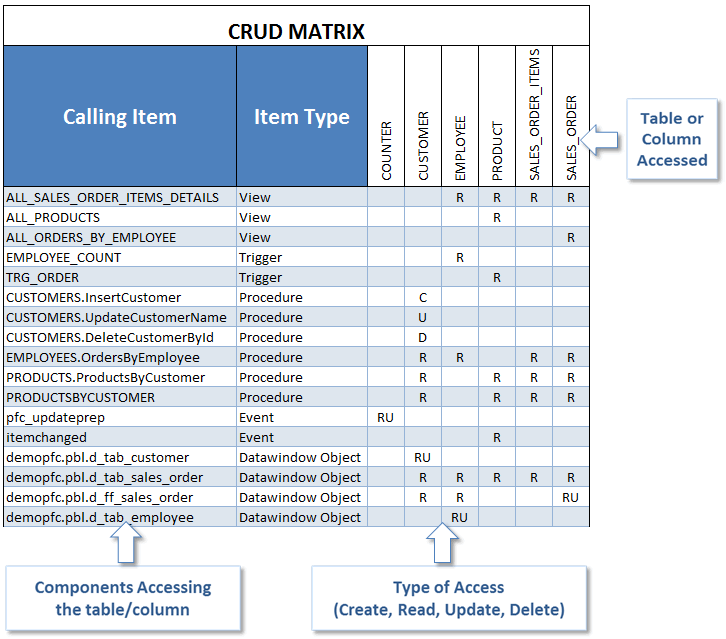
Analyze CRUD Operations (Create/Read/Update/Delete)
This feature generates a CRUD matrix, listing the components accessing tables or columns.
It also indicates the type of access : Create/Read/Update/Delete.
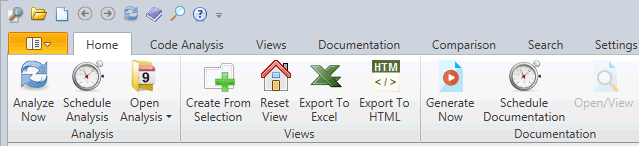
New Ribbon Menu for Visual Expert 2017
Visual Expert 2017 includes a brand-new ribbon menu to make its UI even more productive
New Code Analyzer for SQL Server and Transact-SQL (Beta)
The new code parser analyzing Transact SQL code and SQL Server schemas is is available in Visual Expert 2017 for SQL Server Beta.
Make the Most of Visual Expert Global Search
Visual Expert allows you to run a global search across your application (and also across multiple applications!). The VE search gives you rich results including type, container, and hierarchy information.
New Documentation Engine
Visual Expert 2017 includes a new version of the documentation engine to support larger volumes of code or document a subset of your application.
What’s cooking for Visual Expert 2017?
Between 2 major versions of Visual Expert, we typically publish a number of minor releases, each of them bringing new features – on top of Enhancements and bug fixes.
You will find here what we're planning for 2017.