From finding an issue to confirmed resolution
Review, prioritize, understand impact, fix, and verify that the problem is really gone.
Finding defects is only the beginning. Visual Expert helps teams turn code verification findings into a structured remediation workflow: decide what requires action, understand the impact of a correction, fix the code directly or distribute the work, and confirm resolution with a subsequent analysis.
Review what the analysis found
Not every finding requires the same response. Visual Expert helps reviewers focus on new, critical and important findings, then record an explicit decision for each defect.
Prioritize
Focus on defects that require action and adjust priorities when necessary.
False positive
Record findings that should not be treated as actual defects.
Accepted risk
Document issues that have been reviewed and deliberately accepted.
On hold
Keep a defect visible while postponing remediation.
Understand the impact before you fix
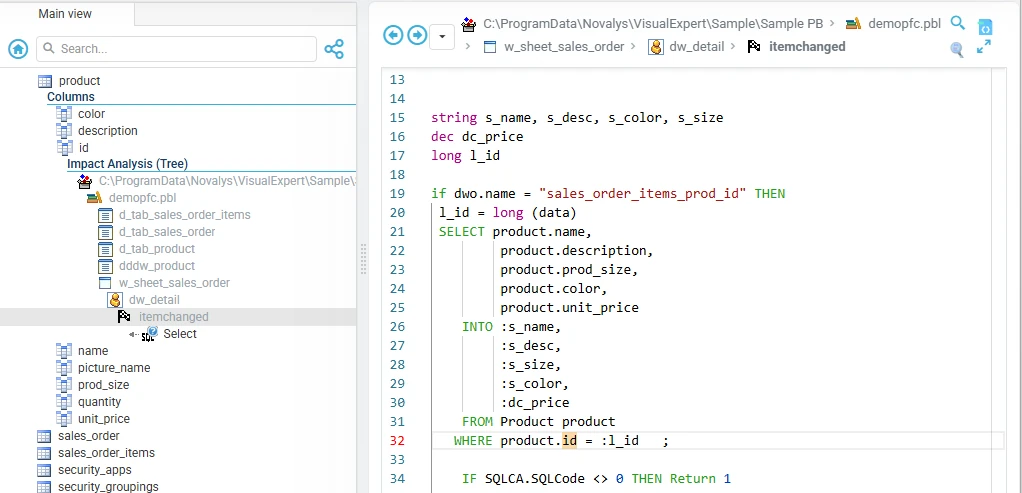
A correction can affect much more than the line where the defect was found. From a defect, developers can use Visual Expert application context and Impact Analysis to understand which objects depend on the affected component before making a change.
“If I change this, what else could be affected?”
- Calling and called objects
- Dependencies between application components
- Table and column usage
- References across application and database code
- Related source code
Open the defect, then Find All References.
- product›idcomponent to change
- demopfc.pbl
- d_tab_sales_order_items
- d_tab_sales_order
- d_tab_product
- dddw_product
- w_sheet_sales_order
- dw_detail
- itemchanged
- Select
- itemchanged
- dw_detail
- demopfc.pbl
The objects that use the component you are about to change, down to the SQL statement that references it.
Simplified view of a real impact analysis (PowerBuilder sample application).
Fix it yourself, or assign the work
Once a defect has been selected for remediation, an individual developer can correct it directly. No task is required.
When remediation needs to be distributed across a team, the defect can be assigned to another user. Visual Expert then creates a linked task with an assignee, reporter, priority, due date and status.
Defects track what needs attention. Tasks help teams distribute the work.
No task required
Task created
Fix with the full context
Whether the developer works directly from the defect or from an assigned task, the remediation stays connected to the original finding and application context.
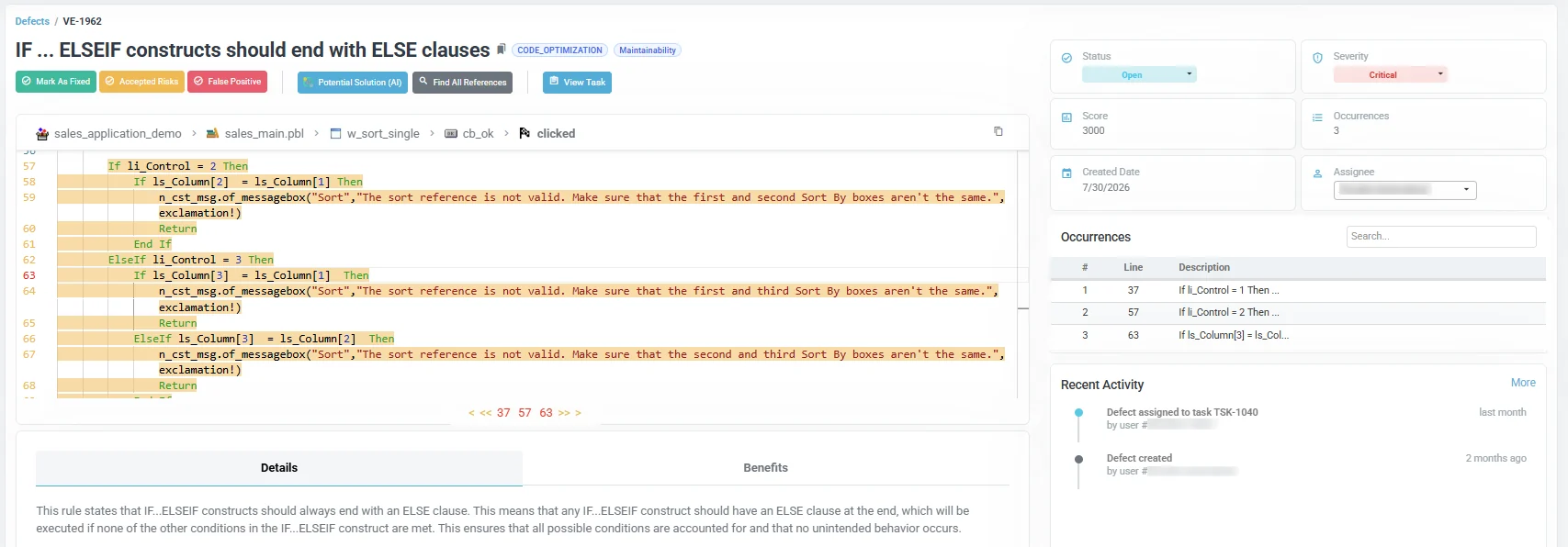
- All occurrences of the rule violation
- Affected source code
- Rule details and potential impact
- Recommended corrective actions
- Activity and decision history
- Links to application context
Optional AI assistance
When Visual Expert AI is enabled, Potential Solution can suggest a possible correction. The developer remains in control: Visual Expert proposes a solution but does not automatically modify the source code.
Do not just close the issue. Verify the fix.
After correcting the code, the developer selects Mark As Fixed. The defect moves to Pending Validation: the correction has been reported, but Visual Expert has not yet confirmed it.
At the next analysis, Visual Expert checks the code again. If the defect is no longer detected, it is automatically marked Resolved. If it is still detected, remediation continues.
“Fixed” is a developer statement. “Resolved” is confirmed by the next analysis.
Keep managers informed
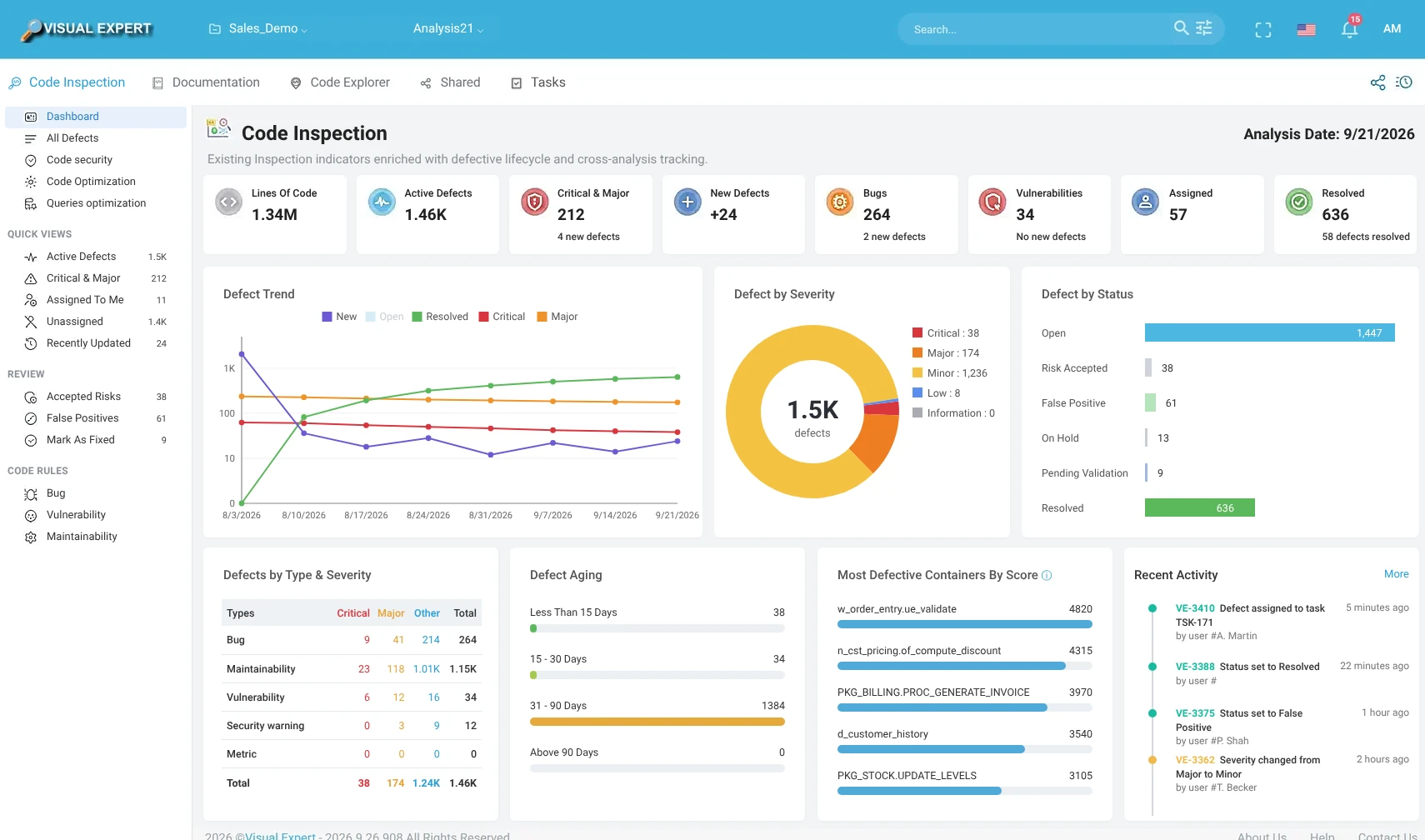
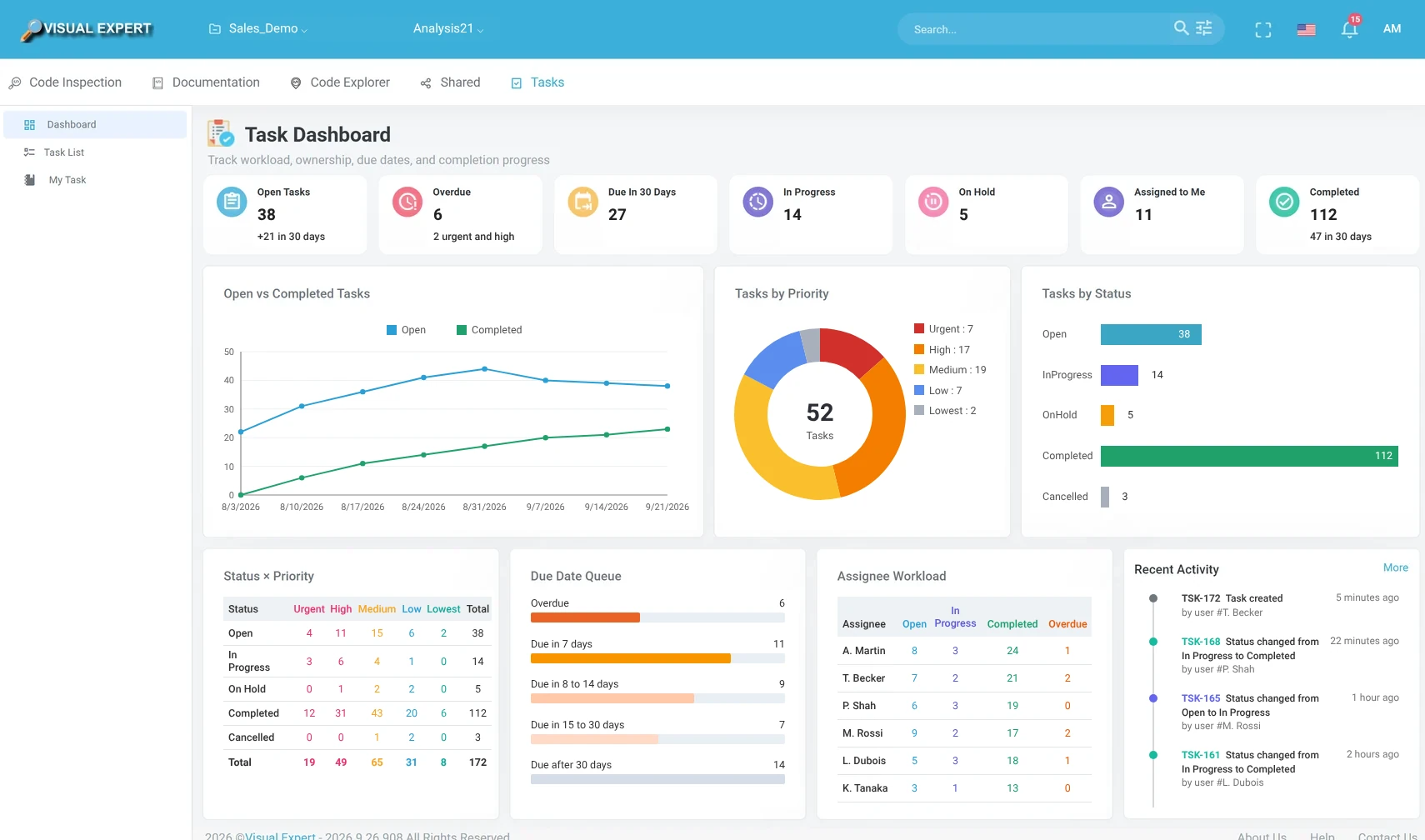
Remediation should remain visible without requiring managers to review individual defects one by one. Visual Expert dashboards provide a consolidated view of remediation activity and progress across the application.
- New, active and resolved defects
- Critical and major findings
- Remediation trends across successive analyses
- Assigned and unassigned work
- Overdue tasks and upcoming deadlines
- Workload and progress by team member
| Assignee | Open | In Progress | Completed | Overdue |
|---|---|---|---|---|
| Developer A | 292 | 260 | 280 | 91 |
| Developer B | 262 | 258 | 262 | 79 |
| Developer C | 257 | 259 | 279 | 75 |
Simplified view of the Visual Expert Web dashboards.
Stay informed without opening Visual Expert
Managers can also receive periodic email notifications summarizing recent activity. For example, a weekly notification can highlight new defects, critical or major issues, defects resolved during the period, overdue remediation work and important changes in the overall situation.
The email can include a compact dashboard summary, allowing managers to monitor progress at a glance and open Visual Expert only when further detail is needed.
Illustration of the weekly email summary.
Turn code verification into continuous improvement
Visual Expert connects detection, application understanding and remediation in one continuous process. Teams can preserve decisions, distribute work when needed and use the next analysis to confirm that corrections have actually removed the detected defects.
Go further
Verification
Find vulnerabilities, bugs, quality and performance issues, and dead code.
Team workflow
Share analysis results and coordinate remediation across the team.
DevOps integration
Run verification automatically and publish the results to your tools.
Defect & task management docs
Statuses, review decisions, tasks and dashboards in detail.
Find the issue. Understand the consequences. Fix it. Confirm the result.
Visual Expert helps teams systematically improve PowerBuilder, Oracle PL/SQL and SQL Server T-SQL applications.