
Defect & Task Management - Concepts
Visual Expert analyses your application against a set of code rules. It reports what it finds as defects.
Defect management gives each defect a lifecycle. You can prioritise a defect, dismiss it, or assign it to a developer as a task. You then follow it until an analysis confirms it is gone.
This page defines the terms used in the Defect Management and Task Management pages. Read it before the other pages.
On this page
- Key terms
- Defect types
- Severity levels
- Defect lifecycle
- How defects and tasks relate
- Example of how a team shares the work
- What the dashboard shows
Key terms
- Rule – A coding practice that Visual Expert checks. Each rule has a type and a default severity.
- Code container – The object that holds the code, such as a window, a function, an event, a stored procedure or a package. Visual Expert reports each defect against the container that directly holds the code.
- Defect – A violation of a specific code rule detected within a specific code container. It is the item that you prioritise, assign responsibility for, close, and track.
- Occurrence – A specific location in the container where the rule is broken. A defect can have several occurrences.
- Task – The unit of work created when you assign a defect. A task has its own assignee, reporter, priority, due date and status.
A status, an assignment or a task applies to the defect as a whole, not to each occurrence. Review all the occurrences of a defect before changing its status.
Defect types
Each defect takes the type of the rule that produced it. There are five types:
- Bug – Identifies potential functional or logical errors that may cause incorrect results or unexpected application behaviour.
- Maintainability – Highlights code issues that may make the application difficult to understand, modify, or maintain over time.
- Vulnerability – Identifies potential security weaknesses that may expose the application or its data to security risks.
- Security Warning – Highlights code patterns that may introduce security concerns and require further review.
- Metric – Provides measurable information about the codebase, helping users assess its size, complexity, and overall quality.
Severity levels
- Critical – Highest potential impact on application stability, security or functionality. Typically requires immediate attention.
- Major – Significant impact on functionality, performance or reliability. Should be addressed with high priority.
- Minor – Limited impact on quality or functionality. Can be addressed as part of regular maintenance.
- Low – Minimal impact on application behaviour, still worth addressing for code quality.
- Information – Provided for awareness. Not a functional or security concern.
Defect lifecycle
- Open – The defect has been detected and is active. It stays Open after you assign it, until its status is changed.
- Risk Accepted – The defect has been reviewed and accepted as a known risk. No remediation is planned, and the decision stays recorded for traceability.
- False Positive – The reported issue has been reviewed and is not a valid defect, or does not apply to this application. The defect leaves the active remediation workflow but its history is kept.
- On Hold – Work on the defect has been paused and will be reviewed later.
- Pending Validation – A developer has declared the defect corrected. Visual Expert checks the correction at the next analysis: if the defect is no longer detected, it moves to Resolved.
- Resolved – The defect is no longer detected in the code. This status is set by Visual Expert at the next analysis, not by a user: it records a technical observation rather than a decision.
How defects and tasks relate
Assigning a defect creates a task. The task is where the work is tracked and discussed; the defect is where the finding and its status live. Both keep their own status, and they move at different moments.
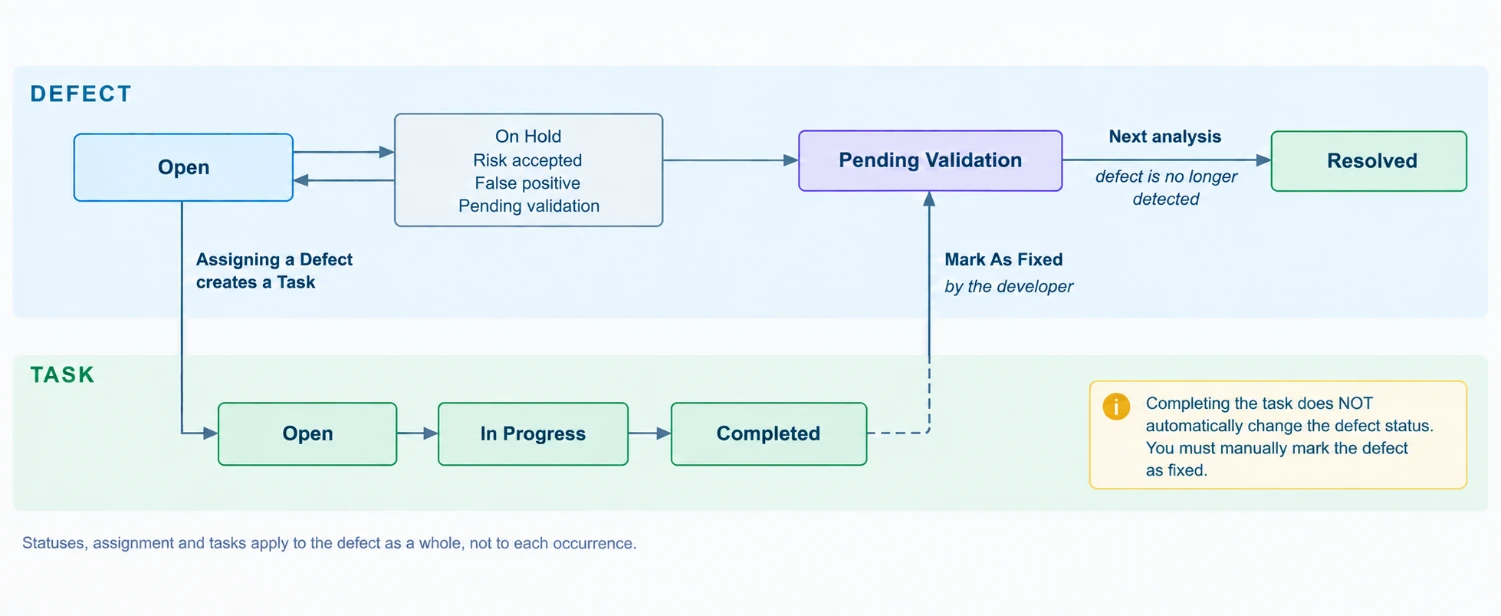
Completing the task does not change the status of the defect. The defect moves to Pending Validation only when someone clicks Mark As Fixed on the defect itself.
Tasks are currently always created from a defect.
Example of how a team shares the work
The procedures of this documentation are grouped by activity. The split below is one way a team can share these activities. It is an example, not a requirement.
- Triaging – One person reviews what the analysis found, records false positives and accepted risks, adjusts severities and assigns the work. See Triaging defects.
- Fixing – The assignee reviews the occurrences, corrects the code and marks the defect as fixed. See Fixing defects.
- Following – One person monitors workload, overdue tasks and how the number of defects evolves between analyses. See Following remediation progress.
What the dashboard shows
The dashboard shows the results of the most recent analysis. The analysis date is at the top right.
The counters also show what changed since the previous analysis. The Defect Trend chart shows how the defects change over several analyses.
Earlier analyses are still available to browse the code and its documentation. The dashboard is not recalculated for them.
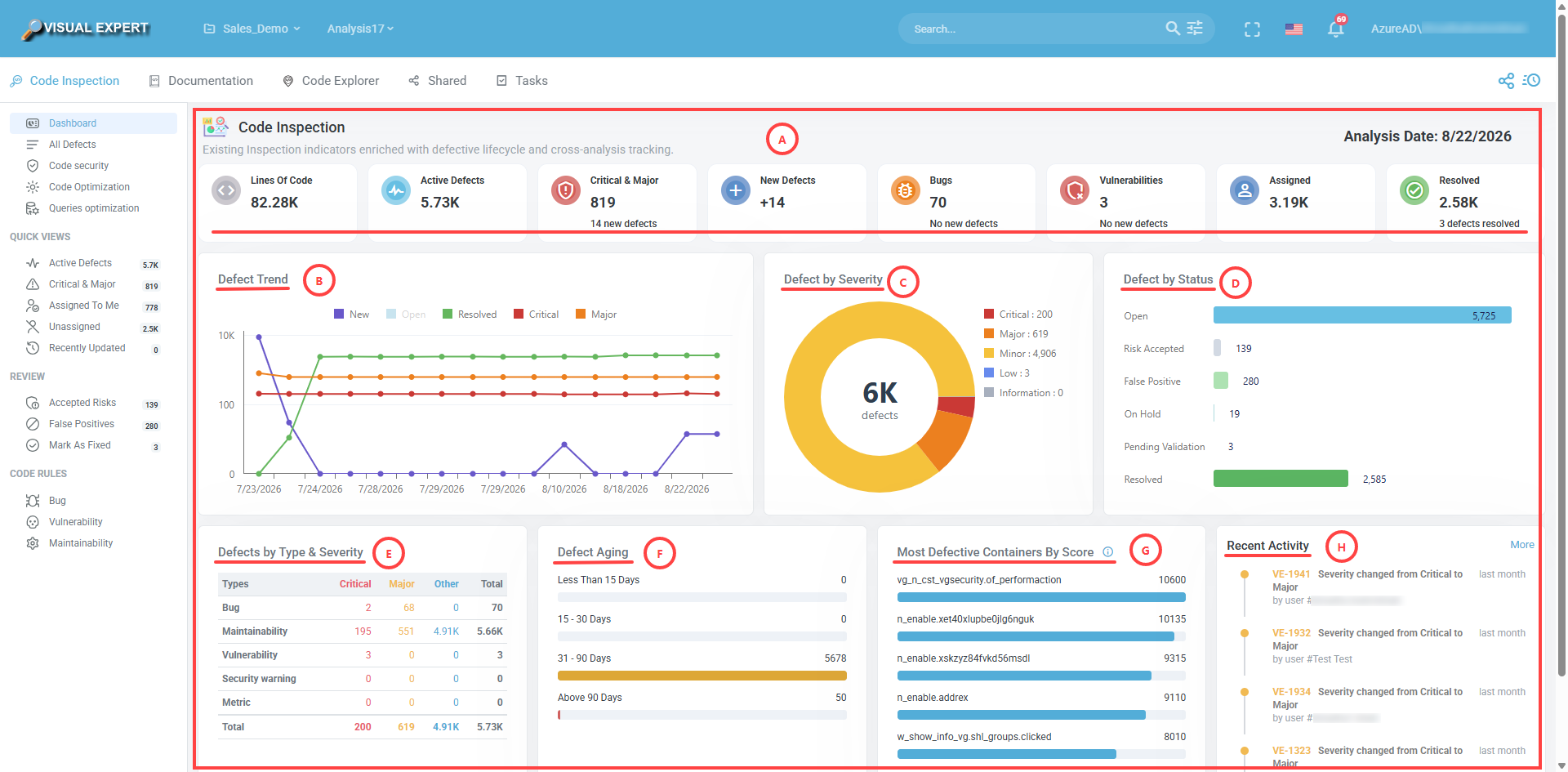
See Defect Dashboard for what each section of the dashboard contains.