
Waiting Room for Users | Visual Expert
Overview
The Waiting Room feature lets users track their queue position and view other users waiting for a license.
The interface displays real-time queue updates, active sessions, and license usage details.
Users with Full Access permissions can also disconnect active sessions to free licenses for queued users.
When the Waiting Room Appears
- All concurrent licenses are currently in use.
- A user launches VE Desktop or accesses VE Web.
The user remains in the queue until a license becomes available.
VE Desktop Waiting Room
VE Web Waiting Room
Waiting Room Interface
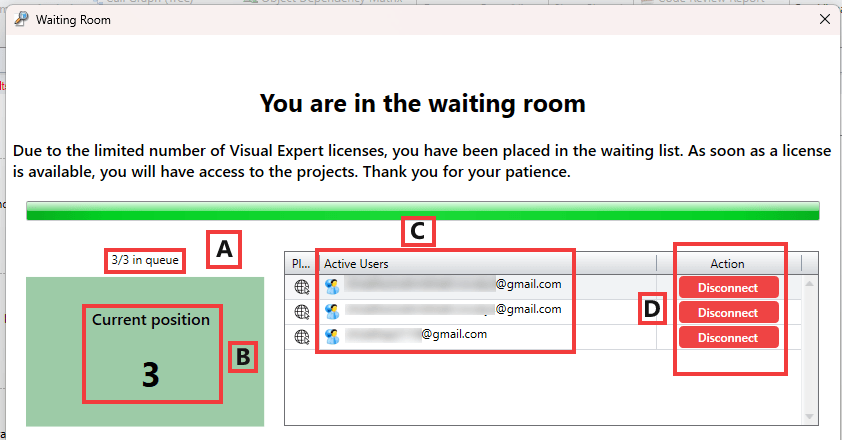
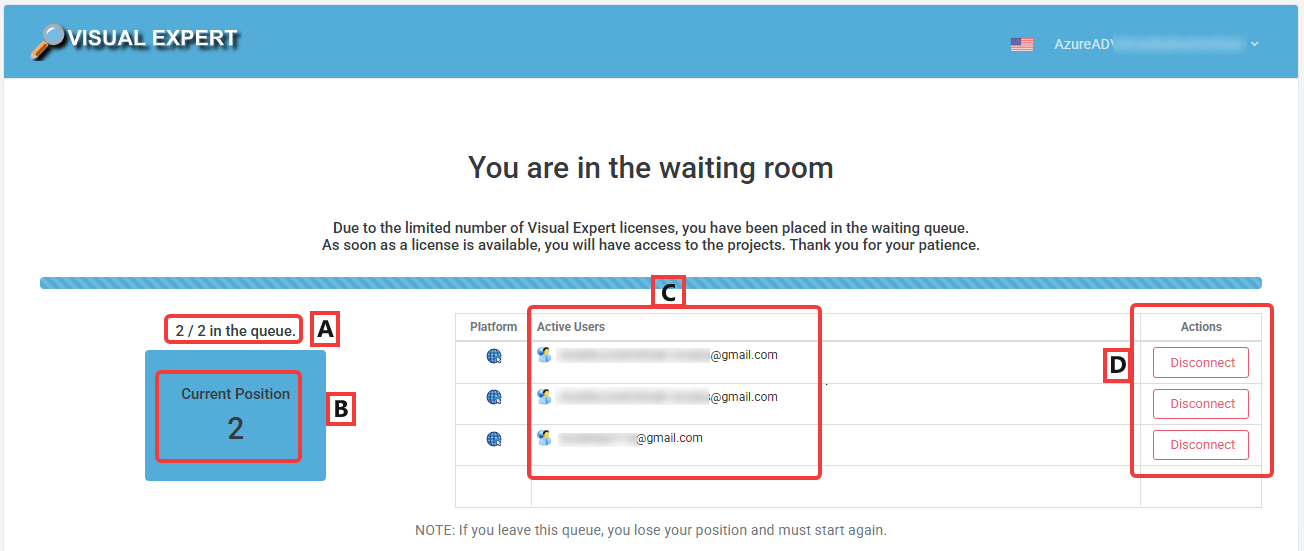
A – Queue Status
Displays the total number of users in the queue and the user's relative position (for example, 1/2 in queue).
B – Current Position
Displays the user's exact position in the queue. Visual Expert updates this value automatically when licenses become available.
C – Active Users List
Lists all users currently using Visual Expert licenses, including their platform details.
D – Actions
Users with the Full Access role can disconnect active users to release licenses for queued users.
License Allocation Behavior
- Visual Expert assigns licenses on a first-come, first-served basis.
- When a user exits Visual Expert, the system assigns the license to the next user in the queue.
- The Waiting Room updates automatically in real time.