
Troubleshooting Local DB Connection Issues
Overview
Connecting to the master repository on the LocalDB is required to configure Visual Expert for local use. TThe master repository acts as the central storage for project data, configuration settings, and analysis results.
A successful LocalDB connection allows you to:
- Run code analysis locally
- Manage repositories
- Maintain version control without relying on a shared SQL Server or network database
When to Use This Guide
Use this procedure if:
- Visual Expert fails to connect to the local master repository
- The repository is missing or unavailable at startup
- Analysis or repository operations cannot be executed locally
Prerequisites
- Close all running instances of Visual Expert
- Stop the Visual Expert Scheduler from Windows Services and the system tray
Step-by-Step Resolution
Step 1: Open Command Prompt
Open Command Prompt as Administrator.
Step 2: List Existing LocalDB Instances
List all LocalDB instances by running:
sqllocaldb iCheck whether an instance named VISUALEXPERT exists.
Step 3: Create the LocalDB Instance (If Missing)
sqllocaldb create VISUALEXPERTIf the instance already exists, proceed to the next step.
Step 4: Restart the VISUALEXPERT Instance
sqllocaldb stop VISUALEXPERT
sqllocaldb start VISUALEXPERT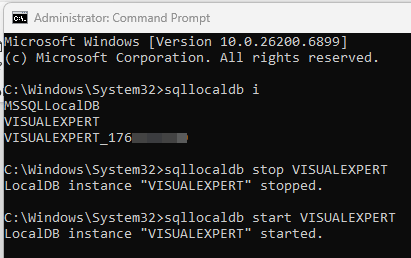
Validation
Reopen Visual Expert and verify that the connection issue is resolved.
If the problem persists:
- Restart the system
- Reopen Visual Expert and test again
Additional Recommendations
For improved stability and performance, especially in team environments, use SQL Server Standard, Enterprise, or Developer Edition instead of LocalDB. Refer to the SQL Server 2019 Installation Guide (Developer Edition) for detailed setup instructions.