
AI Service: Explain the Business
Description of the Service
The "Explain the Business" AI service automatically generates a business-oriented explanation of the selected code item—such as methods, functions, procedures, or windows. It provides insights into the functional role of the code within the application's business logic. This service is specifically designed for non-technical stakeholders, including business analysts, project managers, and business experts, helping them grasp the purpose and context of technical elements without needing programming knowledge.
How to Use It
The "Explain the Business" AI service can be used in two main ways within Visual Expert:
From the Code Explorer
- Open the Visual Expert interface.
- Navigate through the treeview to select the code item (method, function, procedure, etc.) you wish to explain.
- In the navigation bar, click on AI Services.
- Select Explain the Business.
- A business-focused explanation of the selected code will be generated.
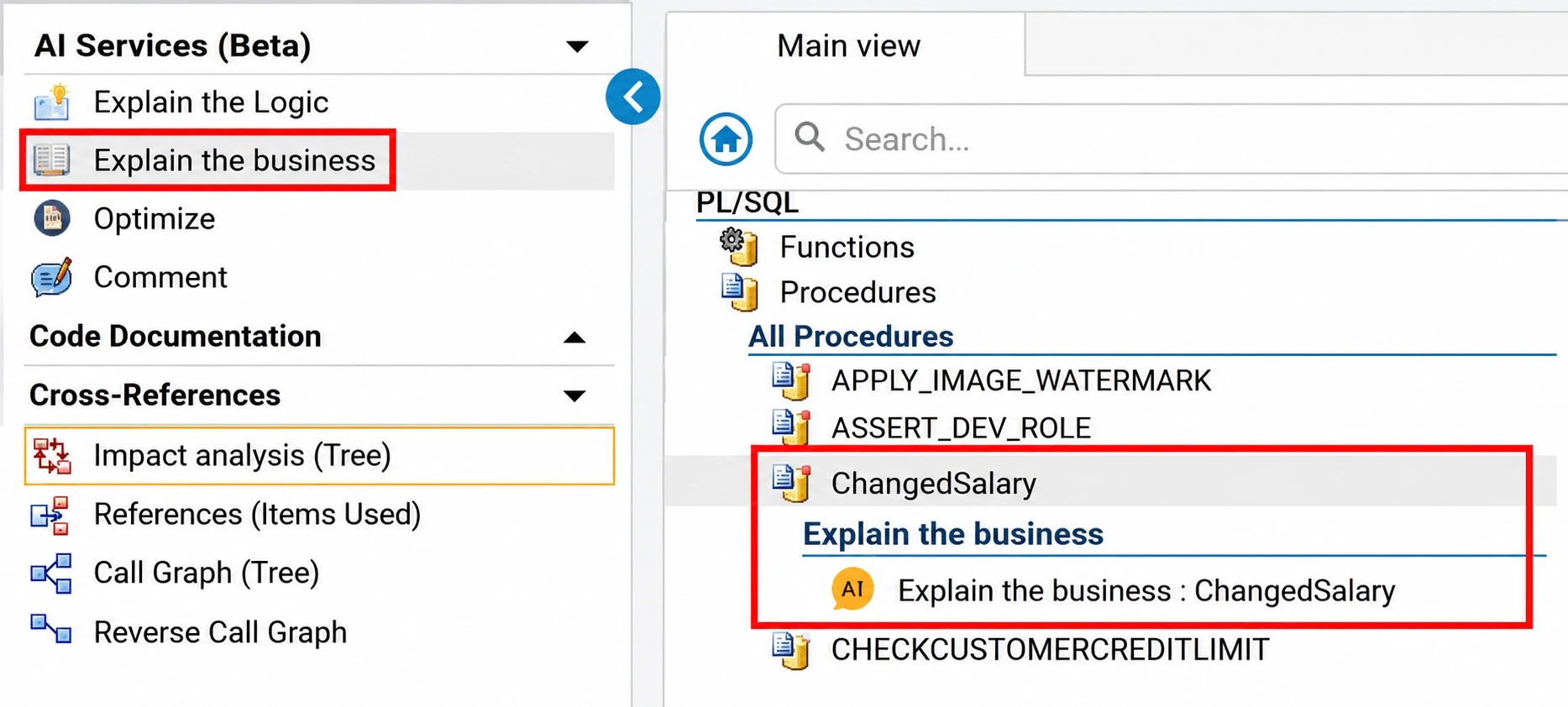
Documentation Workspace
- Log into Visual Expert WEB.
- Open the Documentation workspace.
- Browse your code and select the specific object you need to document.
- In the Description section, activate the Explain the Business AI service.
- The business-level explanation will automatically appear.
Use cases
Typical scenarios for using "Explain the Business" include:
Improved Business Communication
Bridging gaps between technical teams and business units, enabling stakeholders to understand the purpose of specific code without needing technical expertise.
Enhanced Documentation
Generating accessible documentation to support business analysis, training, or onboarding processes.
Business Process Reviews
Facilitating discussions about business rules and logic embedded in existing code, streamlining reviews and audits by providing clear and straightforward explanations.
Project Management
Helping project managers understand functional dependencies and make informed decisions on prioritizing changes and enhancements.
Examples
The following examples illustrate how the Explain the Business AI service transforms technical code into business-oriented descriptions that can be understood by non-technical stakeholders.
Table of Contents
PB Window
The business purpose of this Window is to manage quotations, production jobs, sub-jobs, production processes, materials, costs, and related commercial documents throughout the complete order-to-production lifecycle.
Business Processes Identified
1. Job Creation
Supports creation of new quotations or production jobs, assigning business identifiers, default dates, customer references, ownership details, and initial production status.
2. Customer Assignment
Manages the main customer and owner information for the job, including business address, contact references, and descriptive information used later in documents and job summaries.
3. Process Import
Allows an existing standard production process to be selected and copied into the current job, reducing manual setup and ensuring consistency with predefined production methods.
4. Bill Materials
Manages the product structure required for the job, including components, quantities, variants, and the materials that must be consumed during production.
5. Material Withdrawal
Supports withdrawal of required materials from the bill of materials into production phases, helping the business connect component usage with specific manufacturing steps.
6. Production Phases
Defines the sequence of manufacturing phases, including phase numbers, processing order, work descriptions, departments, machines, operators, and execution timing.
7. Work Operations
Manages internal or outsourced work activities connected to each production phase, including supplier references and related purchasing or subcontracting document needs.
8. Machine Planning
Maintains the machines and alternative machines required for production, including setup, waiting, maintenance, dismantling, execution time, and production capacity references.
9. Operator Planning
Associates operators with production phases so that labor requirements, operator costs, and production responsibilities can be planned and reviewed.
10. Cost Calculation
Calculates summarized material costs, labor costs, machine costs, total phase hours, and agreed prices to support profitability review and commercial decision-making.
11. Sub-Job Management
Supports creation and management of sub-jobs under a main job, allowing complex work to be split into smaller controlled production units while retaining the parent job relationship.
12. Quotation Conversion
Allows a quotation to be converted into a production job, preserving the commercial origin while resetting production-specific status and references for the new job lifecycle.
13. Job Duplication
Enables copying an existing quotation or job into a new one, helping the business reuse similar production structures, materials, phases, and commercial information.
14. Document Generation
Generates or displays the commercial document linked to the quotation or job, such as an offer or customer order, using the job details, pricing rows, notes, discounts, and customer information.
15. Offer Closure
When a quotation becomes an order, the related offer can be closed and referenced from the generated order, maintaining commercial traceability from offer to confirmed production.
16. Planning Protection
Prevents deletion or uncontrolled modification of jobs that have already been included in production planning, protecting the integrity of downstream production schedules.
17. Validation Control
Checks required information before saving or generating documents, ensuring that business-critical data such as job type, customer, process, material, and sequence information is complete.
18. Deletion Control
Handles controlled deletion of phases, materials, details, jobs, and sub-jobs, including checks to prevent removal of phases with recorded production time or parent jobs with existing sub-jobs.
19. Progress Sequence
Manages the expected advancement sequence for the job, allowing production progress to follow a defined workflow and use default sequences when no custom sequence is provided.
20. Job Review
Provides a dedicated view of the selected job so users can inspect the full business context, including customer, process, materials, phases, costs, documents, and production references.
PB Event
The business purpose of this event is to confirm, validate, and finalize the saving of an article master record together with all related commercial, accounting, pricing, production, image, cost, and logistical information.
Business Processes Identified
1. Change Confirmation
The process first determines whether there are any meaningful changes to save. If no changes exist, no further business action is performed.
2. Article Identification
The article code and its variant-related identifiers are checked to ensure that the article can be uniquely recognized across the company records.
3. Variant Normalization
Missing variant components are standardized so the article identity remains consistent, even when some variant fields are not applicable.
4. Article Classification
The article type is reviewed to distinguish descriptive, standard, base-variant, or variant articles. Business fields that are not relevant for certain article types are cleared to avoid inconsistent classification.
5. User Approval
Before the final save, the user is asked to confirm that the article information should be permanently updated.
6. Barcode Control
If barcode management is active, the entered barcode is checked to ensure it is not already assigned to another article. If a duplicate barcode is found, the user may request a recalculation.
7. Accounting Compliance
When accounting management is enabled, mandatory purchase and sales account references are required before the article can be saved.
8. Cost Validation
Article cost information is checked to ensure that required cost values, quantities, and cost classifications are complete and valid.
9. Price List Validation
All price lists related to the article are verified for consistency, including supplier purchase prices, supplier work prices, customer sales prices, promotional prices, customer-specific prices, destination-specific prices, and last-price records.
10. Fixing Validation
If the article has fixing-related price information, the linked fixing article must be valid, and its pricing information must also be coherent.
11. Audit Assignment
The process records whether the article is being inserted for the first time or modified later, assigning the responsible operator and date accordingly.
12. Mandatory Review
Required business information across the article record is checked before final saving, preventing incomplete article data from being accepted.
13. Related Data Alignment
Before finalization, all related article information is aligned with the main article identity, including descriptions, linked articles, production data, customer and supplier references, notes, workings, materials, locations, image groups, and costs.
14. Complete Article Save
The article and all related business areas are saved together as one complete update so the article master remains consistent across purchasing, sales, accounting, logistics, production, and pricing processes.
15. Failure Protection
If any part of the update fails, the entire save is rejected so that partial or inconsistent article information is not retained.
16. External Synchronization
After a successful save, the article information is aligned with any configured external business repository.
17. Screen Refresh
Once the update is completed, the article entry area is cleared and prepared for the next article entry or maintenance activity.
18. Pricing Counters
Price list counts are refreshed so users can immediately see the current number of valid prices associated with each pricing category.
19. Default Restoration
Standard default values, such as default measurement or tax-related business settings, are restored for the next article operation.
20. Operational Readiness
The process ends by returning the article management activity to a ready state, allowing the user to continue with another article maintenance task.
Oracle Package
The business purpose of this Package is to manage Electronic Funds Transfer agreements for vendors and individuals so that payments can be created, updated, expired, deleted, and maintained with the correct payment, remittance, account, and participant information.
Business Processes Identified
1. Agreement Intake
The process receives agreement information from an external source system and prepares it for business validation. It identifies whether the agreement belongs to a vendor, an individual, payroll, travel, miscellaneous, CCR, web, or other payment source.
2. Payment Classification
The agreement is categorized by payment type so that the correct business rules can be applied. Vendor agreements are handled differently from personal payment agreements, and travel or miscellaneous payments have additional dependency checks.
3. Status Determination
The agreement status is interpreted as a new agreement, update, expiration, or deletion. If an agreement already exists, incoming activity is treated as an update; if no existing agreement is found, it is treated as a new agreement.
4. Authorization Validation
The authorization date is checked to ensure the agreement has a valid business effective date. If a newer agreement already exists, the incoming transaction is rejected to prevent older information from replacing current payment instructions.
5. Waiver Handling
The process determines whether the recipient has an EFT waiver. If no waiver exists, payment account and EFT method information are required. If a waiver exists, the agreement may proceed without normal EFT account details.
6. EFT Method Selection
The EFT delivery method is validated and used to determine how remittance advice and payment format should be handled. This ensures the payment agreement supports the correct remittance communication method.
7. Remittance Naming
The remittance name is established based on the agreement source. CCR and web agreements use a remittance advice name, while other agreements use individual name components such as last name, first name, middle name, and suffix.
8. Vendor Processing
For vendor agreements, the process confirms that the vendor exists before allowing expiration or deletion. For CCR-related vendor agreements, organization information, addresses, electronic contact details, and related identifiers are maintained as part of the agreement lifecycle.
9. Person Processing
For individual agreements, the process confirms that the person exists before allowing expiration or deletion. For payroll agreements, person identity, name, and address information may be created or updated as part of agreement maintenance.
10. Travel Validation
Travel and miscellaneous agreements are validated against payroll agreements. A travel or miscellaneous agreement generally requires a related payroll agreement for the same person before it can be accepted.
11. Deletion Protection
When deleting or expiring certain payroll agreements, the process checks whether related travel or miscellaneous agreements exist. This prevents removal of a primary agreement when dependent payment agreements are still active.
12. Account Maintenance
The agreement is linked to the recipient's financial account. When account information changes, the prior account details may be preserved for historical or notification purposes before the agreement is updated.
13. Agreement Creation
When no existing agreement is found, a new EFT agreement is created with the validated business information, including participant, payment type, waiver, account, remittance, source system, and contact details.
14. Agreement Update
When an existing agreement is found, the current agreement is updated with the latest validated business information. Status, effective dates, remittance details, account linkage, and source-system information are refreshed.
15. Expiration Handling
When an agreement is expired, only the agreement status and related effective status information are changed. This allows the business to retain the agreement history while stopping future use.
16. Deletion Handling
When an agreement is deleted, the business status is marked as deleted and related vendor information may also be removed when appropriate. For CCR agreements, related organization, address, electronic contact, and historical records are coordinated during deletion.
17. Agreement Lookup
The process supports business inquiries to find an agreement by vendor, person, payment type, or agreement identifier. This allows other business functions to confirm whether an agreement exists and what status it currently has.
18. Agreement Inquiry
The process provides agreement information such as remittance name, effective date, status, waiver, payment type, source system, lockbox number, account reference, and contact information for business use.
19. Error Rejection
When required business information is missing or invalid, the agreement is rejected rather than posted. This protects payment accuracy and prevents incomplete or inconsistent EFT agreements from being accepted.
SQL Server Procedure
The business purpose of the Candidate Resume Search process (Procedure "uspSearchCandidateResumes", from MS AdventureWorks-2019 project) is to help recruiters find relevant job candidates by matching resume content with the words or ideas entered in a search request.
Business Processes Identified
1. Search Preparation
The process receives the recruiter's search request and prepares it so that candidate resumes can be matched according to the selected search preferences.
2. Language Selection
The process uses the selected language preference when available, or applies the organization's default language setting when no specific language is provided.
3. Expanded Matching
When broader matching is requested, the process includes related word meanings and word variations to improve the chances of finding suitable candidates.
4. Related Terms
When synonym-based matching is requested, the process searches for resumes that may contain similar or related terms instead of only the exact words entered.
5. Word Variations
When variation-based matching is requested, the process includes different forms of the searched words so that candidates are not missed due to wording differences.
6. Exact Matching
When no broader search option is selected, the process searches resumes using the exact search phrase provided by the recruiter.
7. Candidate Ranking
The process returns matching candidates along with a relevance score, allowing recruiters to focus first on the candidates whose resumes best match the search request.
8. Recruitment Support
The overall process improves hiring efficiency by helping recruiters quickly identify candidates whose resumes align with required skills, qualifications, or experience.
More AI Services from Visual Expert
- AI Service: explain the Logic
- AI Service: generate comments
- AI Service: optimize your code
- AI Service: suggest a solution to a code inspection issue