
Connect Oracle Server for Performance Data
Prerequisites
An Oracle Client must be installed on the user’s system before connecting. The database user must also have access to V$SQL, which contains the performance data. It helps to extract the data and map it back to the VE entity.
Required database permissions:
GRANT SELECT ANY TABLE, SELECT ANY DICTIONARY, UNLIMITED TABLESPACE TO <DBUser>;
GRANT SELECT_CATALOG_ROLE TO <DBUser>;
- Create a new Visual Expert project with Oracle code.
- Select your code directly from the database -
If you need to export performance data in a file, please see this article.
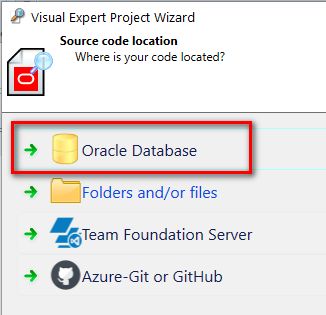
Which database will you analyze?
The choice of the database analyzed will determine from where you will collect performance statistics. Ideally, you would analyze a production database.
If you do not have access rights to the production database, a test or development database may be suitable, provided it is used enough to generate relevant performance statistics.
Start collecting Performance Statistics
- Specify and test your database connection.
- Start the code analysis.
- Activate the code performance features.
When the analysis is completed, open the "Performance" tab in the Ribbon menu and click on [Activate].

This will automatically start generating some performance statistics when your code is executed.
After clicking on "Activate":
- Visual Expert will check it has the necessary access rights for your Oracle database.
- Attempt to create a performance event session in your Oracle database.
- Display a message if an issue is detected.
Analyze DB Performance
To get a combined analysis of the code and the database performance:
- Wait for enough code to be executed to get relevant DB Performance statistics.
- Run a project analysis.
You can stop collecting execution statistics anytime:
Simply open the performance tab and click on [Deactivate].