Inspect the security of your PowerBuilder code
Visual Expert analyzes your existing PowerBuilder applications, flags risky code patterns and takes you straight to the object and the line involved.
- An automated, repeatable analysis, where a full manual review is not realistic
- A single project covers your PowerBuilder and Oracle PL/SQL or SQL Server T-SQL code
- Move from each detected issue to its exact location in the source code
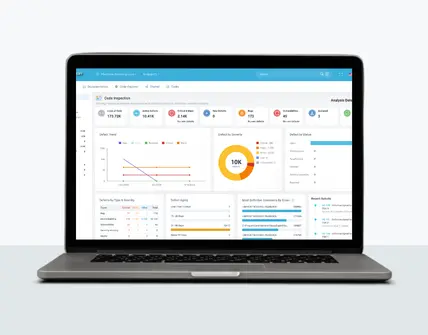
- Prioritize by severity, track trends and new defects from one analysis to the next
Analyze your PowerBuilder code
Request an evaluation version to inspect the security of your PowerBuilder code.
Built for PowerBuilder, from the application to the database
Visual Expert is built for PowerBuilder. It analyzes PowerBuilder objects in their own structure (windows, DataWindows, user objects, functions and events) together with the related Oracle PL/SQL or SQL Server T-SQL code, within a single project.
PowerBuilder objects
Windows, DataWindows, user objects, functions and events are analyzed in their own structure.
Application SQL queries
SQL queries are analyzed along with the rest of the code, where injection risks actually sit.
Application and database
A single project covers PowerBuilder code and Oracle PL/SQL or SQL Server T-SQL code. The inspection spans both.
Detect security risks across your PowerBuilder code
In an application maintained for years by successive teams, risky code patterns are scattered across thousands of objects. Visual Expert surfaces them using built-in security rules.
Instead of manually reviewing thousands of objects, your team can focus on the issues that genuinely need attention.
SQL injection risks
Detect potentially unsafe query constructs in PowerScript and DataWindows.
Hard-coded sensitive data
Spot credentials, encryption keys, IP addresses and other sensitive values embedded directly in the source code.
Insufficient input validation
Identify user input that is not properly validated or sanitized before processing or database access.
Sensitive data handled in clear text
Spot code that stores, transmits or displays sensitive information without appropriate encryption or protection.
Go straight to the code involved
For each detected issue, Visual Expert opens the exact location in the source code: object, event, function or DataWindow. Developers review the code in context, without searching for it manually across the application.
- Open the PowerBuilder object involved in one click
- Review the triggered rule and the code involved in context
Focus on the issues that matter, and follow them through to the fix
Each analysis produces results to sort, assign and follow up. This matters from the very first analysis of an existing application, which returns a large volume of results, and in every analysis after that. Visual Expert lets you narrow the results down to what matters and follow each retained issue through to validation.
- Filter by severity, rule category and application scope
- Mark a result as a false positive: the marking is kept from one analysis to the next
- Track new defects and the trend in volume from one analysis to the next
- Assign retained issues to team members
- Track remediation through to validation
From detected issue to fix
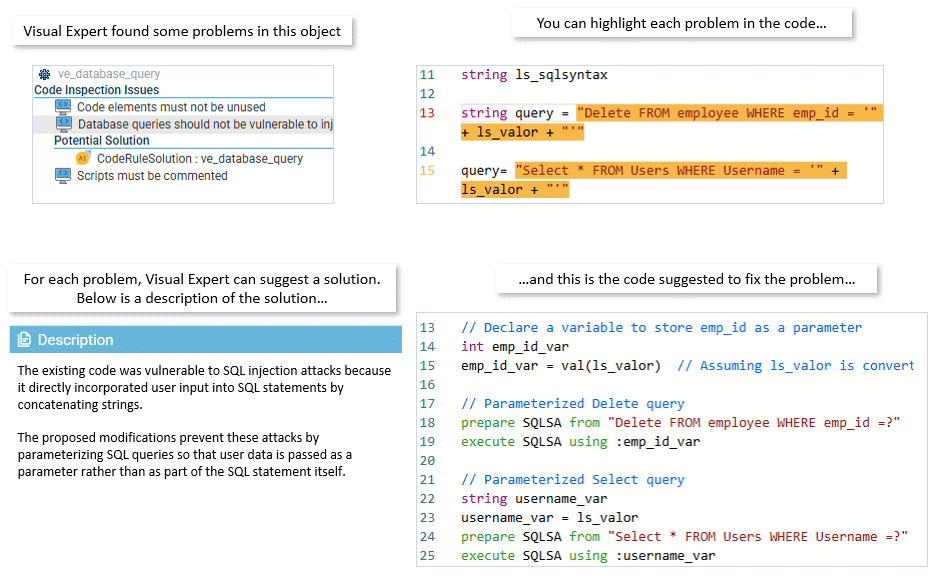
For an issue found by code inspection, Visual Expert AI can suggest a concrete fix based on the issue and the context of the code involved. The developer reviews the suggestion before applying any change.
- Understand why the inspection rule was triggered
- Get a fix suggestion tied to the detected issue
- The developer keeps control of the final change
Ready to inspect your PowerBuilder code?
Run a security inspection on your own application, or discuss your PowerBuilder code and your use case with our team during an online demo.
Request a demoDocument your application security controls
Visual Expert keeps the history of issues detected, fixed and validated, ready for internal controls and auditors.
- History of inspections and their results
- History of fixed issues and their validation
- Evidence of regular security review on existing applications
- Useful in maintenance, modernization or compliance projects
Vulnerability categories covered
Security inspection rules map to recognized application vulnerability categories.
Inspection results and history can feed the documentation expected under ISO 27001, SOC 2 or NIS2. Visual Expert contributes to code inspection and documentation activities: compliance depends on your organization's overall security program.
Automate security inspection
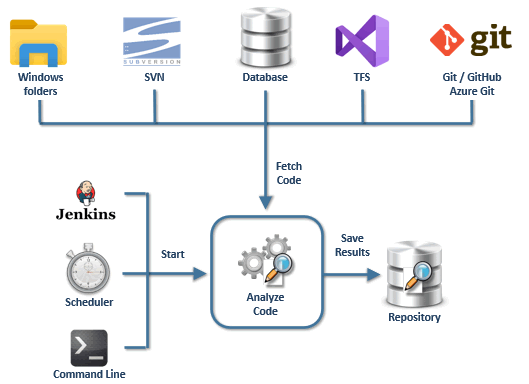
Integrate Visual Expert into your Jenkins or GitLab workflow and run inspections automatically at every build. Combined with new defect tracking, automation surfaces regressions as they are introduced, rather than at audit time.
The same analysis covers bugs and maintainability
Visual Expert applies more than 300 predefined inspection rules and detects, within a single analysis, security issues, reliability defects and obstacles to maintenance.
Security
Detect risky patterns such as SQL injections, hard-coded sensitive data, weak encryption mechanisms and unsafe data handling.
Bugs & reliability
Spot unhandled errors, empty catch blocks and other defects that can affect application stability.
Maintainability
Identify dead code, duplicated code, obsolete components and other issues that complicate long-term maintenance.
Explore Visual Expert with your own PowerBuilder code
Run a security inspection on your own application, or discuss your PowerBuilder code and your use case with our team during an online demo.
Request a demoTeams around the world rely on Visual Expert