Visual Expert Explore, Understand and maintain your applications
Visual Expert for Visual Basic Detailed Features
  Why use Visual Expert?


Impact Analysis

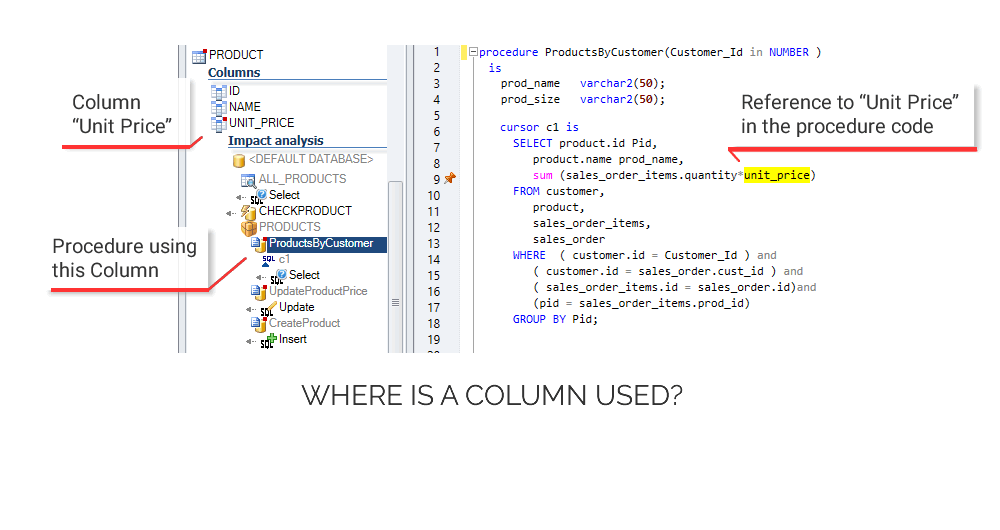
When you modify the source code of the application, there is always a risk of regression and errors due to the modifications.
With just one click Visual Expert helps you to perform those impact analyses on any component (userobject, datawindow...) of the application.

Source code documentation
To write a technical documentation is always long and tedious!
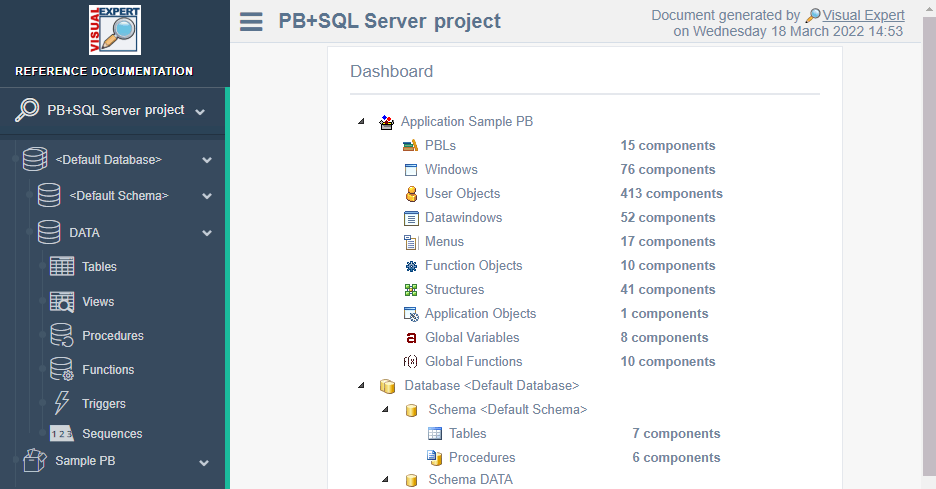
With Visual Expert, generate a complete, customized and always up-to-date technical documentation in minutes.
For example if you need to perform some knowledge transfer about part of an application, you can choose to generate technical documentation only based on Window objects & UserObjects.

Browse through your application
Visual Expert makes it easier to navigate, no matter how complex the application is.
Visual Expert helps you gain time in the development and maintenance of your application and facilitates the integration of new developers.
Visual Expert allows you to :
  - Discover the application structure and its components (pbl, userobject, window, datawindow, menu,...)
  - Explore the inheritance tree and master the framework, (Looking for ancestors, attributes of a window...)
  - See a preview of any application window in order to visualize its aspect and test it,
  - etc...

Improving Source Code
Projects need to follow development rules in order to :
  - Normalize the code
  - Simplify its reading
  - Anticipate maintenance

Visual Expert will help you during the 3 following phases:
  - Before the development, Visual Expert helps to define the development rules
    (you can use the default ones)
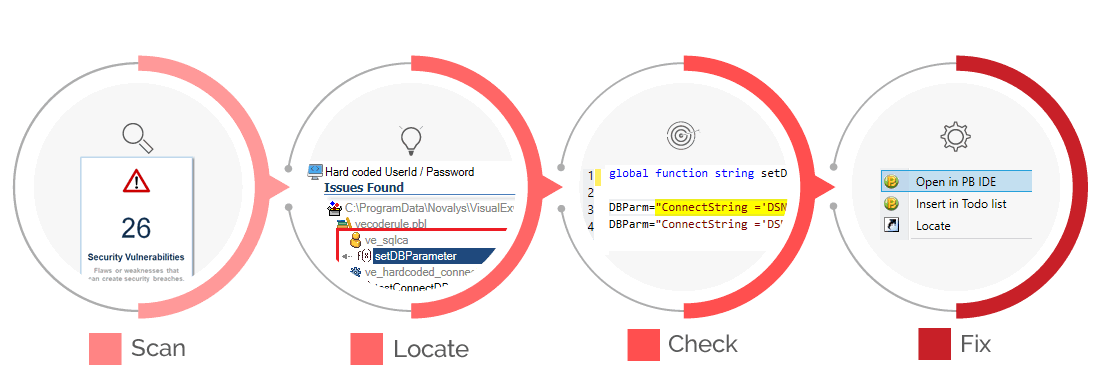
  - During the development, Visual Expert helps to apply the rules and to correct errors,
  - After the development, Visual Expert can search in the whole application
    for unused components and those that do not comply with the rules.

Detecting dead code
Visual Expert detects code in your application.
Dead code includes functions, properties, parameters or variables that are never referenced.
Removing this dead code will improve the performance of your application and the source code will be easier to maintain.

 
Flash Demos
 
Discover Visual Expert’s
main features.

Try Visual Expert
 

Request an evaluation version of Visual Expert and test it on your own application.

Key Benefits
  Why use Visual Expert?

It helps you develop your application without having to deal with the current hassle it usually involves.

See also...
  Press Release.......................click here
References...........................click here
Demos.................................click here
 
  Visual Expert for Visual Basic Detailed features
   
Description Component List List of the components contained in the selected item
  Controls List of the controls contained in the selected item
  Sub-Menu List of the sub-menus contained in the selected menu
  Project Which project contains the selected item?
  Member of… Which component is the selected item a member of?
  Functions & Events List of the functions and events created or modified in the selected item
  System Functions List of the system functions related to an item
  Properties List of the properties of the selected item
  Global Variables List of the global variables of this project
  Local Variables List of the local variables of the selected method
  System Properties List of the system Properties related to the selected component
  User Defined Type List of the User Defined Types of the selected object
  Parameters List of the parameters of the selected method
  Object Type What type of component is it?
Impact Analysis Calling Classes Which classes are referencing the selected item
  Calling Functions Which functions are referencing the selected item
  VB Declarations (DLL)  
  Called Classes Which classes are referenced by the selected item
  Called Methods Which functions are referenced by the selected item
  Called Variables Which variables are referenced by the selected item
  Related Components Which components are related to the selected Message
  Referring Variables List of the variables which refer to the selected item
  Detailed Impact Analysis Which components are related to the selected item or object (called, inherited, etc.)
Architecture Container Hierarchy List of all containers of the selected item
  Calling Hierarchy Treeview of all successive items calling the selected item
  Called Hierarchy Treeview of all successive items called by the selected item
  Opening Hierarchy Treeview of all successive forms or menus opened by the selected item
  General Architecture Treeview of all the controls, methods and variables composing the selected item structure
  Menu Architecture Treeview of all the sub-menu and options composing the selected menu structure
  Control Architecture Treeview of all the controls composing the selected item structure
Miscellaneous Unused Functions List of the functions for which Visual Expert found no references
  Unused Global Func, List of the global functions for which Visual Expert found no references
  Unused Properties List of the properties for which Visual Expert found no references
  Unused Local Var. List of the local variables for which Visual Expert found no references
  Unused Global Var. List of the global variables for which Visual Expert found no references
  Unused (category) List of the items for which Visual Expert found no references
  Unused dll Functions List of the dll declared in the project for which Visual Expert found no VB references
  Locate This Category of item Opens the treeview where the selected item is declared in your application
  Preview (Category) Displays a graphical preview of the selected item
     
  Usefull links
   
Visual Basic
PowerBuilder
Partners
EZ TOOLS PBDR
Devonestop PBDJ
Alphabeta-net AZA PowerBuilder FAQ
Andrea VB TeamSybase
Programmers Heaven just PB info
VB Wire  


VE for PowerBuilder - VE for PL/SQL - VE for Transact SQL - Demos - Evaluation Request - Price Request
Enable for PowerBuilder - Visual Guard for .NET - Visual Guard for PowerBuilder

Key Benefits - Key Features - Impact Analysis - Source Code Documentation - Code Review - Change Management - Knowledge Management - Update List - Support - News - Contact - References - Site map
Visual Guard .Net Technical Doc - Visual Guard Support