CODE
EXPLORATION |
PowerBuilder
Components |
After analysing your project,
Visual Expert can list in a treeview:
* The PBL included in the application and the components of
each PBL
* The PowerBuilder object - by type - included in the application
(all the DW of the project for instance).
* The controls, functions, events, attributes, variables,
parameters defined in a PowerBuilder object.
While exploring the code in the treeview, you can also display:
* The container of the selected item (for example, the PBL
containing an object, the object containing a control, the
control containing an event or the event containing a local
variable,...)
* The containier hierarchy (the list of all successive containers
of an item). For instance, the container hierarchy of an event
may display the Control/Objet/PBL/Projet where this event
was defined.
You may display in the treeview some information about menu
objects:
* The complete hierarchy of the menu options defined in a
menu object.
* Same hierarchy, plus all events defined for each menu item. |
Database
Components |
While analyzing your code, Visual
Expert will find all references to database items.
Therefore, you can list in the treeview:
* The database tables referenced by the PowerBuilder code (both
from Datawindows and embedded SQL)
* For each table found, you may list the columns referenced
by the PowerBuilder code.
* The stored procedures called by the PowerBuilder code (both
from Datawindows and PB scripts)
If your application is also composed of DB code (PL/SQL or Transact-SQL),
Visual Expert finds all references to tables, columns and stored
procedures from this DB code.
See Visual
Expert for PL/SQL or Visual
Expert for Transact-SQL pages for more details.
You can have a global overview of your project (PowerBuilder
+ DB code) by installing the appropriate versions of Visual
expert on the same machine. For instance, if your application
is composed of PB code and sybase stored procedures, you may
combine Visual Expert for PowerBuilder and Visual
Expert for Transact-SQL on the same PC. |
| SQL
Queries |
After analysing your project,
Visual expert may display several lists of Procedure:
* SQL statements defined in the application
* SQL statements containing a given string (text search focused
on the SQL statements of the project).
* SQL statements by access type (select, insert, update or
delete Statements)
* SQL statements by definition type (defined in PowerBuilder
Script, Datawindow, Transact-SQL code(1) or PL/SQL code(2)
).
(1) requires Visual
Expert for Transact-SQL
(2) requires Visual
Expert for PL/SQL |
Inheritance
dépendencies |
Visual Expert analyses all inheritance
dependencies. As a result, you can display:
* The direct descendants (childs) of a PowerBuilder object
* The descendant hierarchy (multi-level treeview of all successive
descendants objects). For instance, you can get the complete
inheritance hierarchy of your application, including Framework
and business objects.
* The direct ancestor of a PowerBuilder object
* The complete ancestor list of an object (all successive ancestors
of a given object).
When an object is inherited, the scripts defined in this objects
may be modified in the descendant Object.
In such a situation, Visual Expert keeps track of the "inheritance"
relationship between the "ancestor" and the "descendant"
script. |
String
search |
You may search for a string in your project.
Several options are available:
* Global Search in the whole project (including PowerBuilder
Code, PL/SQL, Transact SQL, SQL files, ...)
* Search restricted to a given type of component (For instance,
you may search in Windows only).
* You may search in the name and/or the source code of components.
* You use regular expressions in a search (click
here to read about regular expressions)
* You may search into a selection of components (for instance
after selecting some procedures in the treeview). |
| Dll
Calls |
While analyzing your PowerBuilder
code, Visual Expert will find all referencies to dll functions.
As a result, you can list in the treeview:
* The dll used by the application
* For a given dll, which dll functions are declared in the PowerBuilder
code
* For a given dll, which PowerBuilder objects are declaring
the dll functions
* For each dll function declared in PowerBuilder, all PowerBuilder
references to this dll function
(Impact analysis in the PowerBuilder application on a dll function). |
System
and
Application
Globals |
* List of the Global variables
declared in the PowerBuilder application (name+number of calls
to each variable)
* List of the Global functions defined in the PowerBuilder application
(name+number of calls to each function)
* List of the system properties referenced in the PowerBuilder
code (e.g. visible, title, with...)
* List of the system functions referenced in the PowerBuilder
code (e.g. close, opensheet, setpointer...) |
| IMPACT
ANALYSIS
(cross- references) |
Detailed
Impact Analysis |
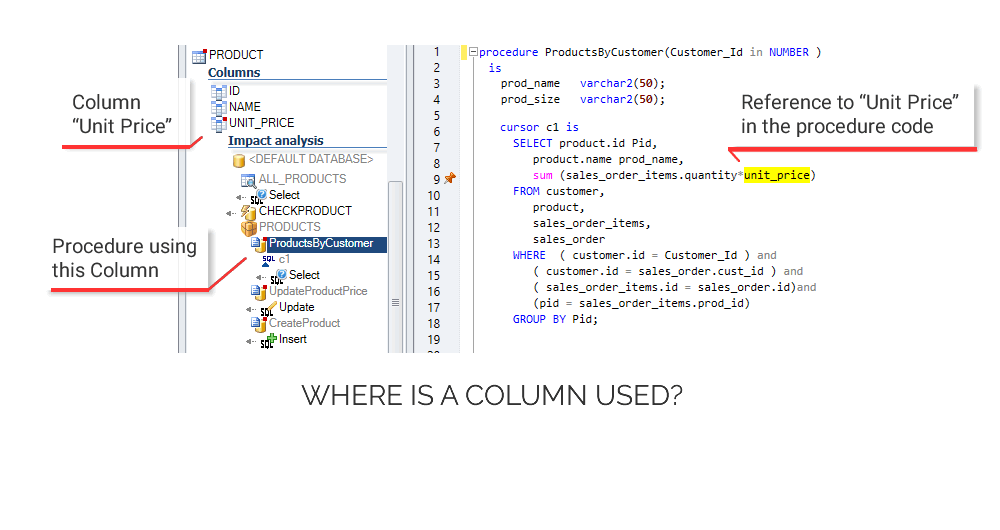
This feature will list all
the components related to a given object, method, variable,
table, column...
You can use this feature before modifying the application:
it will help checking the consequences of the change on the
components related to the change.
In order to provide a complete result, the impact analysis
includes all type of dependencies:
* PowerBuilder-to-database dependencies:
any change in the DB Schema may affect the PowerBuilder components
using the table or column modified. For instance, an Impact
Analysis on a table gives you all Datawindows, Embedded SQL
and Stored Procedures(1) calling this table.
You may filter the references depending on the access type
(Select, Insert, Update Delete)
* PowerBuilder Inheritance dependencies:
any change in a PowerBuilder object may affect its descendants.
Therefore, an impact analysis on a PB object will includes
all its descendants.
* PB code references: An Impact analysis
on a PB object, method or variable lists all the PB objects
and methods calling it. Special PowerBuilder dependencies
are also supported (e.g. the reference between a DataWindow
Column and a DropDownDatawindow).
Impact analyses are also available for Global variables and
functions as well as system properties and functions. The
result contains all references to such variables or functions.
* PB-to-DB Code dependencies:
If your PowerBuilder application calls Stored Procedures,
you can list these procedures:
- You can list all stored procedures called by each PBL of
the application.
- You can list all stored procedures called by each object
coming from a given PBL.
For each Stored procedure referenced by the PB code, you can
peform an Impact Analisys.
As a result, you get all PowerBuilder object and functions
of the application calling this Stored Procedure.
(1) If your application is also composed of Stored Procedures
(PL/SQL or Transact-SQL), Visual Expert analyses all references
to tables and columns from these stored procedures.
See Visual
Expert for PL/SQL or Visual
Expert for Transact-SQL pages for more details. |
| Calling
Hierarchy |
List of all successive methods
calling a function.
The result is displayed in a treeview (e.g. function A is called
by function B, itself called by function C, etc...). |
| Called
Hierarchy |
List of all successive
methods called by a function.
The result is displayed in a treeview (e.g. function A calls
function B, which itself calls function C, etc...).
You may use this feature when you need to understand a complete
process in the application.
(For instance, which functions are executed after the user has
triggered a specific event?) |
| Architecture |
Opening
Hierarchy |
List of all successive windows
or menus opened in the project.
As a result, you get a treeview representing the navigation
paths in the application
(from Windows to Windows and from Menus to Windows). |
| General
Architecture |
Detailed architecture of an
object (treeview of all controls, functions, events and variables
composing the object) |
| Control
Architecture |
Architecture of
the controls composing a PowerBuilder object (presented in a
treeview) |
| Miscellaneous |
Preview |
Displays a graphical preview
of a PowerBuilder Visual Object (Window, DataWindow, Visual
UserObject).
This preview helps understanding the application while browsing
in the code.
You can also locate any control displayed in the preview.
As a result, Visual Expert opens the treeview where the control
is defined. |
| Dead
Code (Unused items) |
* List of the Windows, OserObjects,
DataWindows, Menus, ... not referenced/used in the application.
* List of the functions, events and global functions not referenced/used
in the application.
* List of the attributes, global variables, parameters not referenced/used
in the application.
* List of the dlls and dll functions declared, but not called
in the application. |
| Duplicated
components |
Searches for components with
the same object name and same type in your project. |
| Locate |
Use this feature
to locate an object, method or variable in your project (i.e.
where is this item created/declared in your project?). As a
result, the treeview opens on the definition |
DropDown
Datawindow |
Lists all Datawindows used as
DropDownDatawindows in your project |
Dynamic
Datawindow |
Lists all Datawindows referenced
dynamically in the PB code (e.g. Control.DataObject = "<DataWindow
name>") |
| PBL Statistics |
Statistics about the size and content of
the PowerBuilder Libraries (PBLs) |
| Oversized PBL |
PBL containing too many components |