Visual Expert Explorar, entender y mantener
Preguntas más frecuentes  
 
INSTALLATION REGISTRATION

1. How to analyse my application with Visual Expert ?

2. How can I unlock Visual Expert ?

3. When I try to analyze my application, it says "You tried to open a project with an Evaluation edition of Visual Expert"?

4. What are the minimum system requirements to install and run Visual Expert ?

5. How to install a new release of Visual Expert if I have an old one on my computer ?

6. Does Visual Expert install system DLL ?

VISUAL EXPERT FEATURES

7. Does Visual Expert work on VBA application ?

8. Does Visual Expert work with VB.net ?

9. Does Visual Expert support Visual SourceSafe ?

10. Which versions of Visual Basic are supported ?

11. Does Visual Expert work with Jaguar (or EA Server)?

12. Is there a maximum size for the application to run Visual Expert ?

13. Is the analysis of the application fast ?

14. Does Visual Expert analyse every object libraries or ActiveX used in Visual Basic projects ?

15. Is it necessary to have comments in the application so that VE can extract interesting information?

16. Can VE analyze a large application? - Is there a limit (number of PBL, MBytes)?

17. With VE, can we directly modify the source code?

18. If the application is modified, how does VE take it into account?

19. To see whether a modification (in the PB app) was taken into account by VE, do we have to close and relaunch VE?

20. Which languages will be analyzed in the next versions of VE?

21. With which PB versions is Visual Expert currently compatible?

22. Is VE compatible with PB9?

23. Is VE supported by all Windows versions?

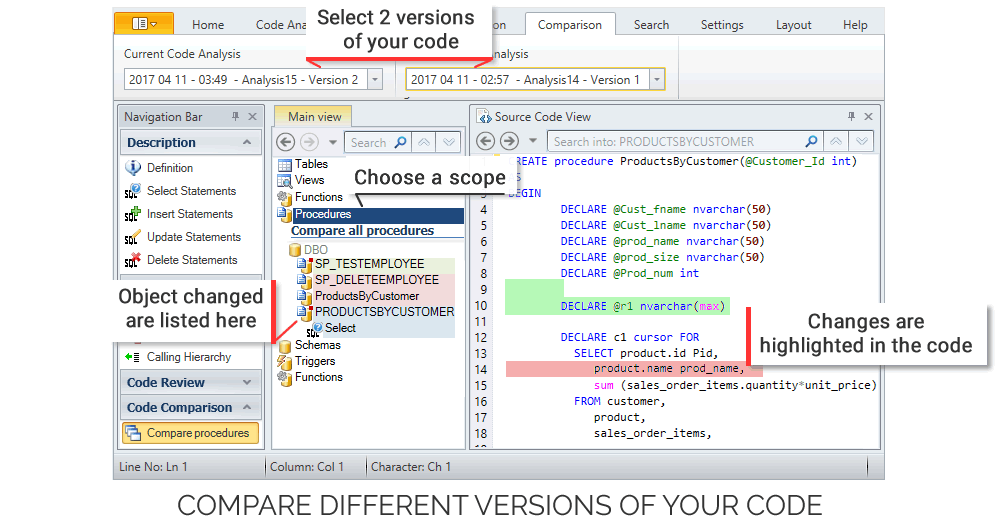
24. Does VE provide "Version comparison" features?

25. Does VE analyze stored procedures?

26. Is Visual Expert only available in English?

27. Can we see the recursive references* on several elements?
Recursives means when a "function 1" calls a "function 2" and this latter calls again the "function".


28. Does VE preserve your previous PB versions? - After a modification of the application, does VE keep somewhere a trace of the old PB code?

29. When searching for a word in the source code (using the "find" field), the required word appears highlighted in red or in pink. Is there a code of colour for the highlighting?

30. Can we change the presentation of technical documentation?

31. In which language was developed VE?

32. Is VE current version multilingual? - Does the same VE version propose all the available languages?

33. Following a modification done on the PB app, when we refresh the analysis done by VE, are the customized views (previously created) preserved and refreshed? - Do they take the modifications into account?

34. After one search, is it possible to perform new requests (impact analysis, inheritance...) directly on the result of this search?

35. How do the VE licences work? - Can a license be installed on several seats?

36. Is it possible to open 2 sessions of VE at the same time?

37. Is it possible to analyse 2 different applications at the same time?

38. Are there any technical skills required to use Visual Expert ?

REFERENCED BUGS

39. How can I obtain a correct preview of my Forms ?

40. When I try to get a preview of a form, it says " Application Error: The exception Integer division by zero".

41. Visual Expert identified functions as unused, but they are not.

OTHERS

42. Is there potential for hackers to gain access to my system, via your program ?


For further technical questions please contact us at support.ve@visual-expert.com

If you have any problems, fill in the following form to ask your question:

Email:
Operation System:
Visual Expert Version
(Menu Help/About):
Message:


INSTALLATION REGISTRATION

1. How to analyse my application with Visual Expert ?

First you must check in [Help-About]
If you have an Evaluation edition (in this case you must downloaded a serial number)

To analyze your project:

  1. Open [File-New] and Select "Visual Basic" or "PowerBuilder"
  2. Select the "New" tab page and Click "OK".
  3. Select your VB or PB version
  4. Specify a name for your project in "Project file" and Click "Next"
  5. Right-click "Project List" and choose "Import VB project"/ "Import PB project"
  6. Select your VB project file (*.vbp or *vbg file) or PB project file and click "Open"
  7. Click "Next", then "Finish"

Your code will be analyzed: you can now use Visual Expert with your Project.

Top

2. How can I unlock Visual Expert?

  • Register your copy
  • Open [Help-Registration Wizard] and Follow the instructions.

If this message appears "An error occured while connecting. Possible error is xxx...":
you probably met registration problems (firewall, proxy server,...), please send your request by e-mail : contact@visual-expert.com :

  • In Visual Expert select [Help-About]
  • Copy and paste the information in an e-mail
You will then receive a key to start a new project on visual-expert.

3. When I try to analyze my application, it says "You tried to open a project with an Evaluation edition of Visual Expert"?

Refer to answer 2.

Top

4. What is the minimum system requirements to install and run Visual Expert ?

Windows 98, Me, NT 4.0, 2000 and XP.
PC Pentium II or better.
At least 64 Mb. RAM.
60 Mb. of free hard disk space.
Word 6 (or later).
IE 4.0.1 or Netscape 4.0 or later.

5. How to install a new release of VE if I have an old one on my computer ?

  • If the new release is a Minor version of the version already installed, you can install it without uninstalling the  old one. It   allows you to save the historic of VE projects list and the Serial Number already typed.
  • If the new release is a Major version, it will be installed on a new folder and it is completily of the old  release."

6. Does Visual Expert install system DLL?

Visual Expert may replace two DLL MSVCRT.DLL and OLEPRO60.DLL if they are too old. A confirmation is asked before the replacement

Top


VISUAL EXPERT FEATURES

7. Does Visual Expert work on VBA application ?

Not for the moment, Visual Expert will probably support VBA in the future.

8. Does Visual Expert work with VB.net ?

The current version of Visual Expert supports VB5 to VB6, Visual Basic.net will be supported in the future.

9. Does Visual Expert support Visual SourceSafe ?

No Visual Expert does not support this product. However there is no conflict between these tools.

10. Which versions of Visual Basic are supported ?

All applications developed with Visual Basic versions 5 to 6.

11. Does Visual Expert work with Jaguar (or EA Server)?

VE analyzes the PB code, no matter if this code is executed on the client seat or on a Jaguar server.

12. Is there a maximum size for the application to run Visual Expert ?

There is no limitation for your project. Application of any size (Visual Expert can analyse hundreds of Visual Basic components. Visual Expert includes powerful source code parsers. The duration of the analyse depends on the size of your application.

Top

13. Is the analysis of the application fast ?

You can test on your station the analysis of the sample application which contains approximately 12 Mb of code. The analysis usually takes less than one minute.

14. Does Visual Expert analyse every object libraries or ActiveX used in Visual Basic projects?

Yes, Visual Expert analyzes any object libraries or ActiveX used in Visual Basic project.

15. Is it necessary to have comments in the application so that VE can extract interesting information?

The main part of the information extracted by VE and useful for the developer results from the application code.
If comments exist in the application, they will enrich the data provided by VE.
If there's no comment, VE remains useful to analyze and help to understand the code.

16.Can VE analyze a large application? - Is there a limit (number of PBL, MBytes)?

There is no limit. Some of our customers have applications which contain more than 250 Mb of PBL (several hundreds of PBL).

17. With VE, can we directly modify the source code?

We bly recommend to use PB to make any code modification. PB is the only tool able to manage the integrity of its own code (otherwise, you risk to compromise your PBL and be unable to open them with PB). For this reason, VE does not modify the code directly. But VE allows you to locate the code: from any selected component, VE indicates to you the PBL, object, control, and method... to open (in PB) in order to modify it.

18. If the application is modified, how does VE take it into account?

It is enough to refresh the analysis. It will be updated in few minutes.
In the main menu, select "Tools" then "Refresh Code Analysis".
VE takes into account the modifications.

Top

19. To see whether a modification (in the PB app) was taken into account by VE, do we have to close and relaunch VE?

It is not necessary to close and relaunch VE. Just select "Tools" and then "Refresh Codes Analysis.

20. Which languages will be analyzed in the next versions of VE?

We are currently working on the version supporting .NET.
Other languages are planned for the future.

21. With which PB versions is Visual Expert currently compatible?

VE analyzes from PB4 to PB9.

22. Is VE compatible with PB9?

VE is compatible with PB9. (We were PB9 beta-testers).
VE is also included in the "PB CD Partner" that is delivered with PB9.

Top

23. Is VE supported by all Windows versions?

VE supports Windows 98, ME, MT4, 2000 and XT.

24. Does VE provide "Version comparison" features?

Not for the moment.It allows today to save the image of a project and thus to historize several versions of a project. You can thus consult the former version of your application even if the source code is not available any more.

25. Does VE analyze stored procedures?

VE is not connected to the database. VE analyzes the PB code, and also all the calls to stored procedures. You can thus know the impacts of a modification of a stored procedure on the PB application. If you have exported your stored procedures, you can include this export in VE's project. The stored procedures are taken into account when doing textual searches.

26. Is Visual Expert only available in English?

Today, VE is available in several languages : French, English, Spanish

27. Can we see the recursive references on several elements?
Recursives means when a "function 1" calls a "function 2" and this latter calls again the "function 1".

We can see themt when we search for an element (object or attribute).
For example: In the "PowerBuilder Components" list, select "Window" and click on "Window list".
Select the window "pfc_w_about" and click on "Functions & events". Select the "of_getclosestatus" function and select "Calling Hierarchy".
"Recursive call !" is displayed in red.
NB: VE does not offer any function to visualize at once all the recursive elements.

Top

28. Does VE preserve your previous PB versions? - After a modification of the application, does VE keep somewhere a trace of the old PB code?

No. There are other specific tools to save previous versions of an application.

29. When searching for a word in the source code (using the "find" field), the required word appears highlighted in red or in pink. Is there a code of colour for the highlighting?

There's no color code.
Only the first selected word is in red, whereas the other occurrences are in pink.
When selecting the 2nd occurrence, it will become red and the first one will appear pink.

30. Can we change the presentation of technical documentation?

You need to buy a separate module, called Cortex.
But to customize the documentation generated by VE, a Wizard offers you many different options.

31. In which language was developed VE?

VE was mainly developed with C++ and a bit with PB.

Top

32. Is VE current version multilingual? - Does the same VE version propose all the available languages?

During the installation, VE recognizes the language of your station. And therefore automatically installs the corresponding language. However, one option enables you to change language (French, English, Spanish). But the documentation templates are only in English.

33. Following a modification done on the PB app, when we refresh the analysis done by VE, are the customized views (previously created) preserved and refreshed? - Do they take the modifications into account?

When you refresh the analysis of VE, all the views previously created disappear (since we cannot plan if the modifications are to be taken into account in the created views). Only the Treeview (in the Mainview) displays the changes carried out

34. After one search, is it possible to perform new requests (impact analysis, inheritance...) directly on the result of this search?

To work on the result of your search, you must first create a new view (by clicking on "Save view" + "Save results").
A new tab will be created next to the "Main View" tab.
You can perform any request on this new tab.

35. How do the VE licences work? - Can a license be installed on several seats?

One VE Licence can be only installed on one station (as PB).
There is not concept of "simultaneous users" or "concurrent users".

Top

36. Is it possible to open 2 sessions of VE at the same time?

No

37. Is it possible to analyse 2 different applications at the same time?

No

38. Are there any technical skills required to use Visual Expert ?

Visual Expert is very easy to install and to use for any VB developer. No specific skills are required, except the basic knowledge of Visual Basic itself.

REFERENCED BUGS

39. How can I obtain a correct preview of my Forms ?

To obtain a correct preview VB6 must be installed on your computer. Each graphic components (OCX, ActiveX) must be installed and correctly registered on your computer. The form must not contain UserControl. The type of the form must be Form but not MDIForm.

40. When I try to get a preview of a form, it says " Application Error: The exception Integer division by zero".

This problem occurs if you had custom tabs on your toolbox in Visual Basic. This bug of Visual Basic is refernced by Microsoft. If you want to fix this problem, you can read the article Q194753 at this address: http://support.microsoft.com/default.aspx?scid=kb;EN-US;q194753

41. Visual Expert identified functions as unused, but they are not.

Dead code includes functions, properties, parameters or variables for which Visual-Expert does not find any reference. However, an incomplete analysis, because of a missing component or a syntax error, can provoque a lack of references and cause a wrong dead code.

OTHERS

42. Is there potential for hackers to gain access to my system, via your program ?

Once installed on your desktop, Visual Expert does not send us any information. Visual Expert will analyze your application to provide you with help and services. The result will be stored on your desktop. You are the only person to decide how to use it

Top


  VE para PowerBuilder - VE para Oracle - VE para Sybase ASE - VE para SQL Server - Demos - Evaluation Request - Price Request
Enable para PowerBuilder - Visual Guard para .NET - Visual Guard para PowerBuilder

Ventajas claves - Características principales - Análisis de impacto - Documentación del código fuente - Revista del código fuente - Gestión del cambio - Gestión del conocimiento - Update List
Soporte - News - Contactos - Referencias - Mapa del sitio
Visual Guard .Net Technical Doc - Visual Guard Support