Visual Expert Explorer, comprendre et maintenir vos applications
Frequently Asked Questions


INSTALLATION ET ENREGISTREMENT

1. Comment analyser mon application avec Visual Expert ?

2. Comment puis-je débloquer Visual Expert ?

3. Lorsque j'essaie d'analyser mon application, j'obtiens le message "You tried to open a project with an Evaluation edition of Visual Expert"?

4. Quelle est la configuration minimum requise pour installer et utiliser Visual Expert ?

5. Comment installer une nouvelle version de Visual Expert si une ancienne version
est déjà installée sur mon ordinateur ?


6. Est-ce que Visual Expert installe des DLL system ?

VISUAL EXPERT FEATURES

7. Est-ce que Visual Expert fonctionne sur les applications VBA ?

8. Est-ce que Visual Expert fonctionne avec VB.net ?

9. Does Visual Expert support Visual SourceSafe ?

10. Which versions of Visual Basic are supported ?

11. Does Visual Expert work with Jaguar (or EA Server)?

12. Is there a maximum size for the application to run Visual Expert ?

13. Is the analysis of the application fast ?

14. Does Visual Expert analyse every object libraries or ActiveX used in Visual Basic projects ?

15. Is it necessary to have comments in the application so that VE can extract interesting information?

16. Can VE analyze a large application? - Is there a limit (number of PBL, MBytes)?

17. With VE, can we directly modify the source code?

18. If the application is modified, how does VE take it into account?

19. To see whether a modification (in the PB app) was taken into account by VE, do we have to close and relaunch VE?

20. Which languages will be analyzed in the next versions of VE?

21. With which PB versions is Visual Expert currently compatible?

22. Is VE compatible with PB9?

23. Is VE supported by all Windows versions?

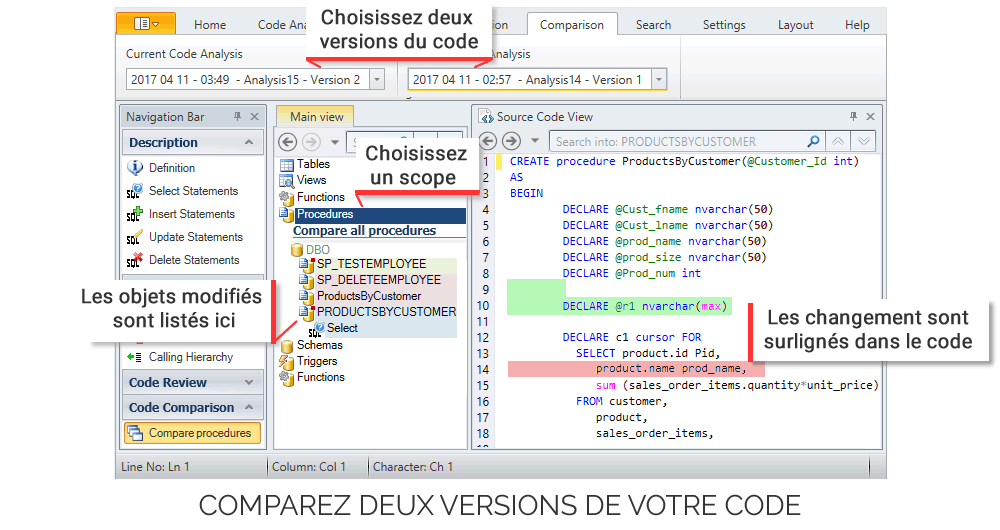
24. Does VE provide "Version comparison" features?

25. Does VE analyze stored procedures?

26. Is Visual Expert only available in English?

27. Can we see the recursive references* on several elements?
Recursives means when a "function 1" calls a "function 2" and this latter calls again the "function 1".


28. Does VE preserve your previous PB versions? - After a modification of the application, does VE keep somewhere a trace of the old PB code?

29. When searching for a word in the source code (using the "find" field), the required word appears highlighted in red or in pink. Is there a code of colour for the highlighting?

30. Can we change the presentation of technical documentation?

31. In which language was developed VE?

32. Is VE current version multilingual? - Does the same VE version propose all the available languages?

33. Following a modification done on the PB app, when we refresh the analysis done by VE, are the customized views (previously created) preserved and refreshed? - Do they take the modifications into account?

34. After one search, is it possible to perform new requests (impact analysis, inheritance...) directly on the result of this search?

35. How do the VE licences work? - Can a license be installed on several seats?

36. Is it possible to open 2 sessions of VE at the same time?

37. Is it possible to analyse 2 different applications at the same time?

38. Are there any technical skills required to use Visual Expert ?

REFERENCED BUGS

39. How can I obtain a correct preview of my Forms ?

40. When I try to get a preview of a form, it says " Application Error: The exception Integer division by zero".

41. Visual Expert identified functions as unused, but they are not.

OTHERS

42. Is there potential for hackers to gain access to my system, via your program ?


For further technical questions please contact us at support.ve@visual-expert.com

If you have any problems, contact us at support.ve@novalys.net:


INSTALLATION REGISTRATION

1. Comment analyser mon application avec Visual Expert ?

First you must check in [Help-About]
If you have an Evaluation edition (in this case you must downloaded a serial number)

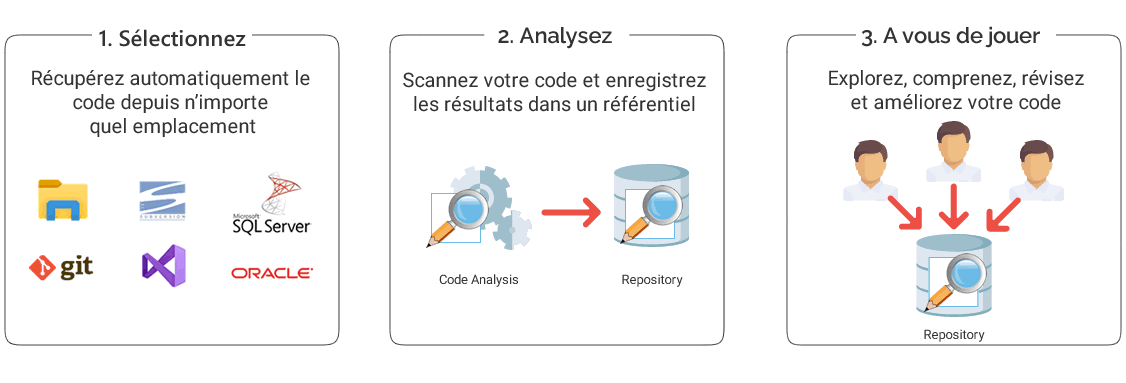
To analyze your project:

  1. Open [File-New] and Select "Visual Basic" or "PowerBuilder"
  2. Select the "New" tab page and Click "OK".
  3. Select your VB or PB version
  4. Specify a name for your project in "Project file" and Click "Next"
  5. Right-click "Project List" and choose "Import VB project"/ "Import PB project"
  6. Select your VB project file (*.vbp or *vbg file) or PB project file and click "Open"
  7. Click "Next", then "Finish"

Your code will be analyzed: you can now use Visual Expert with your Project.

Top

2. Comment puis-je débloquer Visual Expert ?

  • Register your copy
  • Open [Help-Registration Wizard] and Follow the instructions.

If this message appears "An error occured while connecting. Possible error is xxx...":
you probably met registration problems (firewall, proxy server,...), please send your request by e-mail : contact@visual-expert.com :

  • In Visual Expert select [Help-About]
  • Copy and paste the information in an e-mail
You will then receive a key to start a new project on visual-expert.

3. Lorsque j'essaie d'analyser mon application, j'obtiens le message "You tried to open a project with an Evaluation edition of Visual Expert"?

Refer to answer 2.

Top

4. Quelle est la configuration minimum requise pour installer et utiliser Visual Expert ?

Windows 98, Me, NT 4.0, 2000 and XP.
PC Pentium II or better.
At least 64 Mb. RAM.
60 Mb. of free hard disk space.
Word 6 (or later).
IE 4.0.1 or Netscape 4.0 or later.

5. Comment installer une nouvelle version de Visual Expert si une ancienne version est déjà installée sur mon ordinateur ?

  • If the new release is a Minor version of the version already installed, you can install it without uninstalling the  old one. It   allows you to save the historic of VE projects list and the Serial Number already typed.
  • If the new release is a Major version, it will be installed on a new folder and it is completily of the old  release."

6. Est-ce que Visual Expert installe des DLL system ?

Visual Expert peut remplacer les 2 DLL MSVCRT.DLL et OLEPRO60.DLL si elles sont trop ancienne. Visual Expert demande confirmation avant de les remplacer.

Top


VISUAL EXPERT FEATURES

7. Est-ce que Visual Expert fonctionne sur les applications VBA ?

Pas pour le moment, Visual Expert supportera probablement VBA dans le future.

8. Est-ce que Visual Expert fonctionne avec VB.net ?

La version actuelle de Visual Expert supporte les versions VB5 à VB6. Visual Basic.net sera supporté dans le future.

9. Est-ce que Visual Expert supporte Visual SourceSafe ?

Non Visual Expert ne supporte pas ce produit. Cependant il n'existe pas de conflit entre ces deux outils.

10. Quelles sont les versions de Visual Basic supportées ?

Toutes les applications développée avec Visual Basic versions 5 à 6.

11. Est-ce que Visual Expert fonctionne avec Jaguar (ou EA Server)?

VE analyze le code PB, qu'il soit executé sur un poste client ou sur un serveur Jaguar.

Top

12. Quelle est la taille maximum des applications analysées par Visual Expert ?

Il n'y a pas de limitation de taille pour votre projet. Visual Expert peut analyser des centaines de composants Visual Basic ou PowerBuilder. Visual Expert inclut de puissants analyseurs syntaxique de code source. La durée de l'analyse dépends cependant de la taille de votre application.

13. L'analyse de l'application est-elle rapide ?

Vous pouvez tester sur votre ordinateur l'analysis de l'application example qui compte environ 12 Mb de code. L'analysis dure génralement moins d'une minute.

14. Est-ce que Visual Expert analyse tous les objets, librairies et ActiveX utilisés dans les projets Visual Basic ?

Oui, Visual Expert analyse tous les objets, librairies et ActiveX utilisés dans les projets Visual Basic

15. Est-il nécessaire d'avoir des commentaires dans l'application afin que Visual Expert puisse extraire des informations intéressantes?

La majorité des informations extraites par VE et utiles pour le développeur sont issues du code de l'application .
S'il y a des commentaires, ils enrichiront les données fournies par VE.
S'il n'y a pas de commentaire, VE sera d'autant plus utile pour analyser l'application et aider le développeur à comprendre le code.

16. VE peut-il analyser une grosse application ? - Existe-t-il un nombre maximum de PBL, MBytes?

Il n'y a pas de limite. Quelques une de nos utilisateurs travaillent sur des applications qui contiennent plus de 250 Mb de PBL (plusieurs centaines de PBL).

17. Avec VE, peut-on directement modifier le code source ?

Nous recommandons d'utiliser PB pour toute modification du code. PB est le seul outil capable de gérer l'intégrité de son propre code (autrement, vous riquez d'endommager vos PBL et d'être incapable de les ouvrir avec PB). Pour cette raison, VE ne modifie pas le code directement. Cependant, VE vous permet de localiser le code : à partir de n'importe quel composant sélectionné, VE vous indique la PBL, l'objet, le control, ou la méthode... à ouvrir (dans PB) afin de le modifier.

Top

18. Comment VE prend-il en compte les modifications apportées à l'application ?

Il suffit de rafraîchir l'analyse. Elle sera mise à jour en quelques minutes.
Dans le menu principal, sélectionnez "Tools" puis "Refresh Code Analysis".
VE prend en compte les modifications.

19. Doit-on fermer et relancer VE pour voir si une modification (dans l'application PB ou VB) a été prise en compte par ?

Il n'est pas nécessaire de fermer et relancer VE. Sélectionnez simplement "Tools" puis"Refresh Codes Analysis".

20. Quels langages seront analysés dans les prochaines versions de VE ?

Nous travaillons actuellement sur une version supporttant .NET.
D'autres langages sont prévus pour le futur.

21. Avec quelles versions de PB Visual Expert est-il compatible ?

VE analyses les versions PB4 à PB9.

22. Visual Expert est-il compatible avec PB9?

Visual Expert estl compatible avec PB9. (nous avons fait partie des beta-testers PB9 ).
VE est également inclus dans le "PB CD Partner" livré avec PB9.

Top

23. VE est-il supporté par toutes les versions Windows ?

VE fonctionne sous Windows 98, ME, MT4, 2000 et XP.

24. VE fournit-il une fonctionnalité de "comparaison de Version" ?

Pas pour le moment. Il permet actuellement de sauvegarder une image d'un project et donc d'historiser plusieurs versions d'un projet. Vous pouvez alors consulter une version anterieure de l'application même si le code source n'est plus disponible.

25. VE analye-t-il les procédures stockées ?

VE n'est pas connecté à la base de données. VE analyse le code PB, ainsi que les appels aux procédures stockées. Vous pouvez ainsi connaître les impacts d'une modification d'une procédure stockée dans l'application PB. Si vous avez exporté des procédures stockées, vous pouvez inclure cet export dans le projet VE. les procédures stockées sont prises en compte lorsque vous faites une recherche textuelle.

26. Visual Expert est-il disponible uniquement en anglais ?

Aujourd'hui, VE est disponible dans plusieurs langues : Français, Anglais, Espagnol

27. Can we see the recursive references on several elements?
Recursives means when a "function 1" calls a "function 2" and this latter calls again the "function 1".

We can see themt when we search for an element (object or attribute).
For example: In the "PowerBuilder Components" list, select "Window" and click on "Window list".
Select the window "pfc_w_about" and click on "Functions & events". Select the "of_getclosestatus" function and select "Calling Hierarchy".
"Recursive call !" is displayed in red.
NB: VE does not offer any function to visualize at once all the recursive elements.

Top

28. Does VE preserve your previous PB versions? - After a modification of the application, does VE keep somewhere a trace of the old PB code?

No. There are other specific tools to save previous versions of an application.

29. When searching for a word in the source code (using the "find" field), the required word appears highlighted in red or in pink. Is there a code of colour for the highlighting?

There's no color code.
Only the first selected word is in red, whereas the other occurrences are in pink.
When selecting the 2nd occurrence, it will become red and the first one will appear pink.

30. Can we change the presentation of technical documentation?

You need to buy a separate module, called Cortex.
But to customize the documentation generated by VE, a Wizard offers you many different options.

31. In which language was developed VE?

VE was mainly developed with C++ and a bit with PB.

Top

32. Is VE current version multilingual? - Does the same VE version propose all the available languages?

During the installation, VE recognizes the language of your station. And therefore automatically installs the corresponding language. However, one option enables you to change language (French, English, Spanish). But the documentation templates are only in English.

33. Following a modification done on the PB app, when we refresh the analysis done by VE, are the customized views (previously created) preserved and refreshed? - Do they take the modifications into account?

When you refresh the analysis of VE, all the views previously created disappear (since we cannot plan if the modifications are to be taken into account in the created views). Only the Treeview (in the Mainview) displays the changes carried out

34. After one search, is it possible to perform new requests (impact analysis, inheritance...) directly on the result of this search?

To work on the result of your search, you must first create a new view (by clicking on "Save view" + "Save results").
A new tab will be created next to the "Main View" tab.
You can perform any request on this new tab.

35. How do the VE licences work? - Can a license be installed on several seats?

One VE Licence can be only installed on one station (as PB).
There is not concept of "simultaneous users" or "concurrent users".

Top

36. Is it possible to open 2 sessions of VE at the same time?

No

37. Is it possible to analyse 2 different applications at the same time?

No

38. Are there any technical skills required to use Visual Expert ?

Visual Expert is very easy to install and to use for any VB developer. No specific skills are required, except the basic knowledge of Visual Basic itself.

REFERENCED BUGS

39. How can I obtain a correct preview of my Forms ?

To obtain a correct preview VB6 must be installed on your computer. Each graphic components (OCX, ActiveX) must be installed and correctly registered on your computer. The form must not contain UserControl. The type of the form must be Form but not MDIForm.

40. When I try to get a preview of a form, it says " Application Error: The exception Integer division by zero".

This problem occurs if you had custom tabs on your toolbox in Visual Basic. This bug of Visual Basic is refernced by Microsoft. If you want to fix this problem, you can read the article Q194753 at this address: http://support.microsoft.com/default.aspx?scid=kb;EN-US;q194753

41. Visual Expert identified functions as unused, but they are not.

Dead code includes functions, properties, parameters or variables for which Visual-Expert does not find any reference. However, an incomplete analysis, because of a missing component or a syntax error, can provoque a lack of references and cause a wrong dead code.

OTHERS

42. Is there potential for hackers to gain access to my system, via your program ?

Once installed on your desktop, Visual Expert does not send us any information. Visual Expert will analyze your application to provide you with help and services. The result will be stored on your desktop. You are the only person to decide how to use it

Top