|
|
|
| Visual Expert 5.7 Build 80313 |
|
Enhancements
PowerBuilder:
- During the creation of a VE project based on PB4 to PB7
code, it is now possible to select an application (which lists
the PBL found in the PB.INI).
Previously, the only option available for PB7 projects was
a manual selection of PBLs.

Bug Fixes
General:
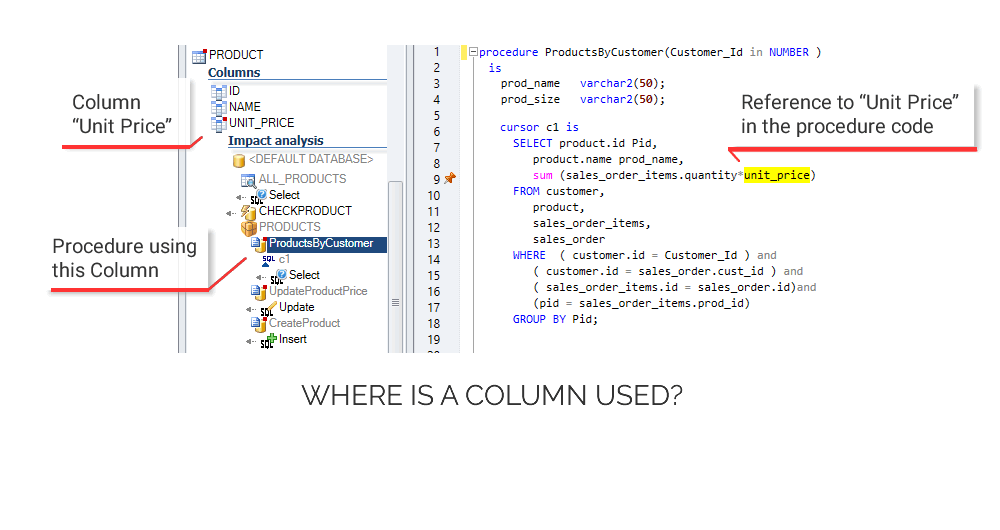
- Impact Analysis on a column named "name" now
runs correctly.
- Dependencies between PB objects and Stored procedures were
partially displayed. More information are now displayed during
impact analysis.
|
|
| Visual Expert 5.7 Build 80218 |
|
New features
General:
- New item in the Navigation bar - “Shared Datawindows” -
listing DataObjects calling each other with the “ShareData”
method. It relates DataWindows having similar data descriptions
(and different presentation layers). For example, when modifying
a data model and then a DW it allows checking whether the
“shared” DWs have to be modified as well.

- New item in the Navigation bar - “Datawindows with expressions”
- listing Datawindows for which some attributes are defined
with an expression. This option is available when selecting
the datawindow entry point in the PowerBuilder section of
the treeview. All datawindows containing expressions in the
current project will be listed.

- The same feature is available for one specific datawindow
(instead of the entire project) with an option called “attributes
with expressions” (in the section “description” of the navigation
bar).
Enhancements
General:
- DataBaseExtractor : a Getting Started guide is now available
in English.
Bug Fixes
General:
- Random IHM Freeze at the creation of projects when adding
folders with extensions.
- Treeviews are now printed correctly.
- Naming rules verification did not work properly with the
sample project.
- Japanese support : some texts in the RTF documentation
were not displayed correctly.
|
|
| Visual Expert 5.7 Build 80122 for PowerBuilder,
PL/SQL and Transact SQL |
New features
General:
- New multi-language support: a new Project Wizard allows
you to create mono or multi language project. You can now
analyse any type of project: PowerBuilder + stored procedures,
or stored procedures separately.

- New project set up ( new pages: properties, add/remove
components)
- Visual Expert now supports text files as entry point
- Support for PB 11 (first level).
- DataBase Extractor (DBE) – a new utility - is installed
with this new version: DBE connects to Oracle, Sybase and
Microsoft Databases to export stored procedures, triggers
and DataModel into text files. Visual Expert will then analyse
these files.

Enhancements
General:
- The option “Change language” is now in the menu
“Option” (previously in “Tool”)
- The « Detailed Impact Analysis » and «
Table » macros have been reviewed. The result is now
presented from the parent object to the smallest object (SQL).
- Impact Analysis has been improved: references to a table
or column are now grouped by PBL and objects, which makes
large results much easier to browse. Impact Analysis are now
also available for DB Views (similar to DB Tables)

Database Parsers:
- The MSSQL and ASE parsers have been improved
- Detail improvements on the PL/SQL & T-SQL parsers
- Support for PL/SQL « view ». Impact analysis possible
from a PL/SQL view.
Bug Fixes
PowerBuilder
- Fixed: analysis of DW expressions
- Fixed: issues for the analysis of « tree » datawindow
General:
- Fixed: Japanese & UNICODE
- Fixed: Many bugs fixed on the GUI for the support of Japanese
language (Unicode) in the tree view, the detail view and title
of windows.
- Fixed: Random crash on the detail view from hypertext links
- Fixed: Crash on the detail view because of UNICODE
- Fixed: Issues with the analysis of PL/SQL code: SQL Oracle
own XML syntax.
|
|
| Visual Expert 5.7 Build 70410 for
PowerBuilder, PL/SQL and Transact SQL |
|
New features
General
- New search window (10 times faster!)
- “Check for update”: Visual Expert informs you
each time a new version is available. This option is also
available with the menu [Help–Check for update].
PowerBuilder
- Visual Expert now analyses datawindow expressions and compute
fields. All items referenced in these expressions are taken
into account in impact analyses.
- First level of supports for PowerBuilder 11. Full support
when the official PB11 release will be available.
Enhancements
General:
- By default, the string searched is highlighted in the source
code view.
Transact-SQL parser:
- Several improvements of the analysis of MS SQL*Server Transact-SQL
code
Bug Fixes
PowerBuilder
- Fixed: Duplicated menu items in some case of inherited menus
- Fixed: Problem when opening PowerBuilder from Visual Expert
(Open in PB IDE)
Top |
|
| Visual Expert 5.7 Build 70227 for
PowerBuilder, PL/SQL and Transact SQL |
|
New features
General
- Analysis exceptions: if, for any reason, an item ca not
be analysed, Visual Expert skips this component and continues
the analysis. An internal error is reported included in the
analysis log. This log can be sent to the support team in
order to improve Visual Expert (menu [Help-Send VE Log file…]).
- It is now possible to export the content of the treeview
in a file or a screenshot:
* Data export: generates a file. Several formats available
(xls, csv, html…)
* Screen-shot (JPG): creates a screen-shot including the selected
information (even if they are not visible on screen).
Enhancements
Transact-SQL parser:
- Several improvement of the transact-SQL parser (both for
Sybase ASE and MS SQL*Server DBMS).
Bug Fixes
General
- Fixed: An internal limitation of Visual Expert caused performance
problems or errors when reading a Datawindow containing a
large data section.
- Fixed: problem with the “locate function” when
locating a control in a datawindow preview
- Fixed: syntax problems in the PowerBuilder parser:
- Syntax of:
IF {cond} THEN {instr1} ELSE {inst2} caused problems for some
{inst2} : DESTROY, RETURN
- Priorité dans la résolution d'un appel de
méthode depuis un contrôle, en cas de conflit
de noms.
- Fixed: OUTER JOIN Syntax problem
- Fixed: INNER JOIN Syntax problem
- Fixed: inexistent « server » items were created
under specific circumstances
Top |
|
| Visual Expert 5.7 Build 70117 for
PowerBuilder, PL/SQL and Transact SQL |
New features
General
- A new window allows to perform a full text search
for a given component type (for example: searching
for the windows, stored procedures or tables containing a
string).
This option named "Quick search"
is available in the navigation bar when selecting the icon
of the component type in the treeview (for example: window,
stored procedure, table...).
The following dialog box opens:
Top
PL/SQL
- A new option of the navigation bar (available when selecting
the SQL icon in the Treeview) allows to select certain
SQL orders depending on:
- the Database access type (Select, Insert, Update, Delete)
- the component type where the SQL order is defined (Datawindow,
PB Script, Stored Procedure…)
The following dialog box opens:
- An option allows to display or not the component containing
each SQL order.
Top
PowerBuilder
- A new option of the navigation bar allows to display references
to stored procedures from the PowerBuilder code
:
- For each PBL of the application:
- Or for each object of the PBL:
- A new option of the navigation bar (available when selecting
the stored procedure icon in the Treeview) allows to select
the stored procedure type depending on their DB
access type (Select, Insert, Update, Delete).
The following dialog box opens:
- Impact Analysis on the Structures: Members datatypes
have been added
- The datetype is available from the members of
a structure :
- Possibility of specifying a path to analyse PowerBuilder
code. It allows to embed all the PBL of an application from
a root.
Top
Enhancements
General
- Visual Expert 5.7 supports Internet Explorer 7.0
- In the files selection dialog box (PL/SQL, Transact, SQL
or VB), a field has been added displaying the 20 first extensions
existing in a path :
- When the source code view displays code resulting of a file,
it is possible to open this file using the
option "Open {Name of the file}" in the pop-up menu
of the source code window.
Top
PL/SQL
- Addition of a link beteween a table and a trigger.
- Addition of hyperlinks in the PL/SQL source code.
Each reference to a stored procedure now includes an hyperlink
to the code of this stored procedure.
- Schemas are taken into account in the
creation of stored procedures of the type:
CREATE [ OR REPLACE ] PROCEDURE { shema
. } name …
- Impact analysis is available for all PL/SQL variables.
- Datatype is available from PL/SQL variables.
- Constants values are dispayed in the treeview
- Constants now have a framed image to differentiate them
from non constant variables.
Top
PowerBuilder
- A new window now allows to select the PowerBuilder
code.
It includes a Treeview listing Workspaces opened with
PowerBuilder, then the Targets of each Workspace.
- A tooltype displays the complete path of a Workspace, whatever
its length.
This window supports any characters type (chinese, japanese,
…)
- Fixed: General error "error calling external function
%s".
This problems can appear at several places as:
- Full text search
- Documentation Generation
Top
Bug Fixes
General
- Fixed: In certain cases, documentation generation causes
errors.
- Fixed: Problem with Visual Expert projects opening when
they are saved with the SaveAs option (missing *.rul file).
- Fixed: Problem of reading PB components in UNICODE when
they have a long comment (between 251 and 255 characters).
- Fixed: Some options of the Navigation Bar and the "Dead
Code" tab of the Detail window do not display for PB
10.5 applications.
- Fixed: Incomplete analysis of a project when the name of
a file contains the character "~".
- Fixed: Problem in the search window, related to the keyboard
entry, the selection and the pop-up menu.
- Fixed: Problem with multi-selection in the treeview with
the "Shift+KeyUp" keys.
PL/SQL
- Fixed: Analysis error when PL/SQL code contains the keyword
"top".
- Fixed: Imposibility to analyse only the type of file "SQL-File".
- Fixed: Bad association of tables / columns in the case of
an update… value… select… order:
Update … Where {colonne} = Select
…
PowerBuilder
- Fixed: Problem of opening PB components in the Japanese
version of PowerBuilder
Top
Visual Expert for Transact SQL
We are pleased to announce the official launch of Visual
Expert for Transact SQL.
To discover all the features of this new version, click
here
You can read here after a preeview of some features specific
to Visual Expert for Transact SQL:
- Visual Expert for Transact SQL supports DDL orders
(analysis of the files containing creation orders
for tables, columns, views… )
- Visual Expert for Transact SQL allows to list separatly:
- Tables containing the data of the
application
- Temporary tables created for Transact SQL programs
(their name begins by #)
- Tables met during the analysis of DML orders (Insert,
Update, Delete, Select)
- Tables met during the analysis of DDL orders
(Create table …)
- Visual Expert for Transact SQL can list separatly:
- SQL orders containing references to the database
(tables, colonnes…)
- SQL orders which do not contain references to the
database.
Example: Select @asresult = Upper(@astring)
To receive a free evaluation version
of Visual Expert for Transact SQL, click
here
Top |
|
| Visual Expert 5.6 Build 60711 for
VB , PowerBuilder, Visual Basic and PL/SQL |
|
Visual Expert for PowerBuilder
Visual Expert 5.6 now supports PowerBuilder 10.5
Visual Expert for Visual Basic
- Bug fixes
Fixed: Analyses problems with Visual Basic
Visual
Expert for PL/SQL - New Product
- Improvement
Visual Expert does not consider the builtin functions of a DBMS
as stored procedures, if the code of this DBMS is not analysed
by Visual Expert.
Coming next:
Top
|
| Visual Expert 5.6 Build 60412 for VB
, PB and PL/SQL |
|
Visual
Expert for PowerBuilder - New features
- Now Visual Expert for PowerBuilder can work with Visual
Expert for PL/SQL. This gives you a complete overview
of a (PB+PL/SQL) application. You can also perform a global
impact analysis on any PB-DBS-PL/SQL item (note: a license for
each of the 2 products is necessary to use them simultaneously).
- Global functions or stored procedures calls are taken into
account into SQL queries. Impact analyses now include these
references.
- SQL queries Analysis: possibility to identify or to exclude
some DBS systems functions in order to display only PowerBuilder
ones.
- New version of the window used to select files for a Visual
Expert project.
- PBL’s size and date are displayed in the PBL selection
window.
Visual
Expert for PowerBuilder - Advanced features
Note: These features are intended to experienced users. On-line
training and support are available to help new users master these
advanced features.
- Analysis of dynamic references:
 |
Reading the source code to analyze an application
(« static analysis») implies some limitations:
the analysis does not include information such as dynamic
references (defined only during the execution of the application).
To enrich the information found by Visual Expert during
the analysis, Visual Expert can now raise exceptions.
An exceptions can be automatically raised by VE or triggered
by a specific instruction inserted in the application code
(formatted comment). A new window has been added to guide
users while defining such exceptions.
For more details Click on the screenshot |
- Custom overloads available by default within VE Setup window
(functions opening windows and functions displaying user messages)
are extended to PowerBuilder build-in functions and attributes.
Visual Expert for PL/SQL - New Product 
- Visual Expert for PL/SQL has recently been distributed as
a pre-release. The official version of the product is now available
(you can read more about VE
for PL/SQL here).
- 2 new options added in the navigation bar: « calling
hierarchy » and « called hierarchy» for every
reference between stored procedures.
- 2 new categories added in the root of the treeview: «
Oracle PL/SQL Built-in types » and « Oracle PL/SQL
Built-in functions ». You can know list such functions
and type and perform impact analysis on them.
- Some PL/SQL code was added in the Sample project of Visual
Expert.
- Source code view: the option « Open File » allows
opening the PL/SQL file displayed in the source code view.
Note: this option is not available when the source code view
only shows a part of a PL/SQL file – for example when
a stored procedure is selected in the treeview and this procedure
is contained in a package, itself contained in a file.
All versions - New features
- Development of a Scheduler to plan the analysis
of a project:
 |
Visual Expert 5.6 includes a tool to refresh
the analysis of the projects in "batch" mode.
The analysis can be scheduled at any time (lunch time,
at night...) from Visual Expert interface.
Click on the screenshot for more information |
- New setup option added to duplicate or not tables with the
same name: the same table can be prefixed in a SQL query and
non-prefixed in another. By default, Visual Expert will consider
them as 2 distinct tables, but this may not be true. This option
indicates whether tables with the same name should be duplicated
or not, no matter which prefix is used.
- Source code view – The auto-highlight option is now
activated by default: the text written in the « find »
field is searched and highlighted automatically in the code.
- Former projects are automatically migrated to VE 5.6.
Bug fixes
- Fixed: problem with the size of the result column next to
a string search.
- Fixed: problem of the « dwEditMask » attribute
in the datawindow previews.
- Fixed: blank lines sometimes appeared in the treeview.
- Fixed: unwanted components sometimes appeared in the results
of a string search (Group of PL/SQL procedures or packages).
- Fixed: a string search in PL/SQL code sometimes returns twice
the same item. Problem fixed by restricting the search to PL/SQL
files only (and not in the source code of all items contained
in such files).
- Improved: Hyperlinks in PL/SQL source code are now available
for each reference found, and only references generate hyperlinks.
- Improved: the result of the treeview option « container
hierarchy » as been refined.
|
|
| Visual Expert 5.5 Build 50711 for
VB and PB |
New Features
New SQL Analyser
- The SQL statement syntax «
1++++2 » authorised by PB, is now supported by VE
- "LIKE … ESCAPE"
now supported in a SQL statement
- "START WITH … CONNECT
BY PRIOR" now supported in a SQL statement
- OuterJoin (+) now supported
in a SQL statement
- When a string composed of spaces
was found in a SQL statement VE created
a non existent column.
- Variables and function calls
are now supported in SQL statements
Example:
string ls[10]
int i
select 'ok', 'ko'
into :u_browse.tag, :ls[gpf()]
from myTable
where :u_browse.control[myFunc(0)+myFunc_TWO(i)].tag
= myColumn
and myColum2 = :i
;"
Code Analysis: The xhtml tag in PB10 DW is now supported
GUI:
- Pressing [CTRL] when clicking
on a link in the source code view avoids synchronising
with the treeview
- New default link for stored
procedures in the Navigation bar
- Japanese characters in the setup
projet window are now supported
- Improvement of the installation
process - Window users with restricted profiles
can now install and use
VE.
- Possibility of adding VBP as
a component in another VBP.
- Possibility of selecting a directory
instead of VBP files: all VBP, in this directory and its
sub-directories will be
automatically added.
- Possiblity of suppressing a
VBP in the property window
- VBP files with the same name
will be renamed when automatically added
to the project.
- Possibility of replacing a COM
component by its project when this component
is not accessible
Impact Analysis:
The columns not associated to a table by Visual Expert (ambiguious
SQL statement ) are now added to the result of the impact
analysis
SQL Analysis :
Improvements
Doc Generation:
- CORTEX is now available
for VE5.5 (tool to create or modify documentation templates)
GUI:
- New icones for the
VB methods
- The message view now only opens
in specific cases
- Improvement in the selection
of PBLs to be analyzed
SQL Analysis
- "Table Alias now supported.
For a dynamic
ResultSet, the alias is kept in the tables' list.
Example:
SELECT t.Col1,
t.Col2, ….
FROM ( SELECT
… FROM … ) t
WHERE t.Col3"
- Supplementary keywords are
now supported when using a "connect by…"
clause in a SQL statement
Bug fixes
Code Analysis
- The characters ',' and '#' are
now supported in the name of a file
GUI
- View suppression problem
- Unwanted obliteration of the
[Search] field in the source code view
- Visual Expert occasionally froze
- problem caused by the .vw file
(files stroring the
views created in the treeview)
- Problem with the display of
the source code when the last line didn't contain any characters
- Overrides were concidered as
comments
- Problem while multi selecting
items in the treeview and de-activating a link in the
Navigation bar
Code Analysis
- Occasional problem when openning
of COM components
- The instructions “Throw
.. Catch” are now supported
Doc Generation
- Crash when the documentation
generated was too large
|
|
| Visual Expert 5.5 Build 41116 release
for VB and PB |
Improvements
For PB & VB
- Enhanced support of right-left (hebrew, arabic) source
code in the source code view.
- The detailed impact analysis on a datawindow now displays
impact analysis on its columns.
Bug fixes
For PB & VB
- Visual Expert crashes sometimes during the suppression
of items in a view.
For PB
- Visual Expert reports syntax error when a method name is
a powerscript keyword (create, destroy, ...).
- Visual Expert reports a syntax error on the script
if TypeOf (aw) = window!then
....
end if
- If a datawindow is duplicated in two PBL, Visual Expert
creates references on the datawindow in the second library.
For VB
- Visual Expert crashes during the import of some projects.
- Visual Expert does not recognize the name of some activex
(VSFLEX7CTL, ...).
- Visual Expert reports a syntax error on the script
With XXX
Redim
.myarray (5)
....
End With
- Visual Expert crashes during the analysis of the script
if x=a then if x=b then myfrm.Show
|
|
| Visual Expert 5.5 Build 41105 New
Major release for VB and PB |
New features
For PB & VB
- Supports DBCS
- Navigation history in the treeview (Previous/Next)
- "History” in the Navigation Bar lists links to
visualise the components modified today, yesterday, during the
week or the month. These links are available for the complete
project level, a pbl or categories (windows, menu, userobjects,
Forms, UserControls...)
- Highlight automatically the “find” field text
in the source code.
- De-installing feature available.
For PB only
- Supports PB10
- New “Override” option: visualize the entire object’s
overrided script and all the overriding script of the object’s
ancestors.
- Additional options: display a method’s "Descendant
scripts" and "Ancestor Script”.
- Additional options: display a method’s "Descendant
hierarchy" and "Ancestor hierarchy".
Improvements
For PB & VB
- The search window: the results are directly saved in the
main view
- The message box which gives you the expiring date will only
appear the last 5 days.
PB only
- Improvements on the “unused functions” feature:
there now is a specification in red when a method is called
by an ancestor script (not directly).
VB only
- Conditional compilation variables are better taken into account.
- The “CreateObject” method is now taken into account
as a object creation method.
Bug fixes
For PB & VB
- The « locate function » didn’t work with
global variables
- The serial number wasn’t correctly saved when you closed
VE.
- An error message box appeared when you asked for a key in
the “Registration Wizard”
For PB Only
- The cascading menus were not taken into account into the
analysis correctly.
- The PB components’ modification date used to be their
compilation date
For VB only
- « propertypages » were not taken into account
as « containers »
Changes
For PB & VB
- Ctrl + A used to refresh the analysis is replaced by Ctrl
+ F5
- Ctrl + A now helps select items in the tree view.
|
|
| Visual Expert 5.0 build 40423
for PowerBuilder |
Improvements
- The registration wizard can now send a mail if the connection
to internet is not available.
- The shortcut CTRL+SHIFT+A allows to select all sub-items
of the selected item in
the treeview.
Fixed problems
- Visual Expert generates error while parsing SQL if the keyword
'Outer' is ommited before the keyword 'Join'.
- The "Unused component" section in the detail view
for a category does not display the same item as the link
"Unused component" in the navigation bar.
- The title of detail view and source view is incorrect in
some case when the view is maximized.
|
|
| Visual Expert 5.0 build 40423
for Visual Basic |
Improvements
- The registration wizard can now send a mail if the connection
to internet is not available.
- The shortcut CTRL+SHIFT+A allows to select all sub-items
of the selected item in
the treeview.
Fixed problems
- In some case, Visual Expert duplicates components when the
path of these components indicates in the different vbp files
are not excatly the same (Visual Expert is case sensitive
for the path of component).
- The title of detail view and source view is incorrect in
some case when the view is maximized.
- In some case, Visual Expert crashes when a type defined
in a module is referenced with the syntax "modulename.typename"
in an other module.
|
|
|
Visual Expert 5.0 build 40226 for PowerBuilder |
Improvements
- The link "PBL & File List" of the project
is now displayed in the same order as they
decalre in the project setup dialog box.
- The link "Control List" is renamed "Control
List or DW".
- When the link "Control List or DW" is clicked
for a control datawindow, the list of the datawindow objects
indicates if the datawindow is assigned statically or dynamically
(into an event/function).
Fixed Problems
- The problem of endless loop in the "development rules"
is fixed.
- When the name of a datawindow object is greater than 32
characters, the link with its control was not
created. This problem is now fixed.
- In some case the links "Controls List", "Control
Architecture" or "General Architecture"
don't display the datawindow object associated to the datawindow
controls.
Visual Expert displays now the right datawindow object.
|
|
|
Visual Expert 5.0 build 40226 for Visual Basic |
Improvements
- Automatic detection of component (ActiveX, OCX,..) shared
between the projects during the
creation of a Visual Expert project from a Visual Basic project
group.
Fixed Problems
- In some case, Visual Expert did not recognize the type (or
indicate a wrong type) of the return value of a function.
- Visual Expert created link on the compilde version of a ActiveX
even the project of this Activex was declared in the Visual
Expert project.
|
|
| Visual
Expert 5.0 build 31112 for PowerBuilder |
| New features
You can now:
Open an object or a script in PB 8 or 9 directly from Visual
Expert
Open more than one instances of Visual Expert at the same time.
List the scripts, which override an ancestor event.
List the scripts, which have been replaced by a descendant event.
List the SQL statements using a column or a table.
List the unused components contained in a PBL
Start the analysis in the batch mode (using the instruction
“<VE_PATH>nve50.exe /a "D:\Program Files\Novalys\Visual
Expert 5.0\Projects\XXXX.pad").
Improvements
Large lists of components are displayed faster in the treeview.
The technical documentation generated is improved: the lists
are now sorted, the override is taken into account, etc…
The naming rules’ verification now takes into account
several prefixes for the scope of a variable
The “development rules check” template has been
improved.
Corrections
The progress bar, which used to appear in the
generated documentation screenshots, was removed.
The analysis problem of some of the nested SQL statements, which
used to generate an endless loop was corrected.
The problem concerning the display of global structures was
fixed.
The problem concerning the display of «Called DDDW »
(Datawindows associated with a field) was fixed.
The problem concerning script headers’ detection with
the option "At first comment" was fixed.
|
| Visual
Expert 5.0 build 31112 for Visual Basic |
Corrections
- Problem when opening VB 6 from VE fixed.
- Problem when the ActiveX analysis refers to uninstalled components
fixed.
- Problems when the script headers’ analysis contains
the word FORM fixed.
|
| Visual
Expert 5.0 Build 30704 for PowerBuilder |
| 1. Multi-lingual
support:
- Visual Expert GUI is now available in several
languages (English, French and Spanish).
- Visual Expert takes into account the specific
characters such as the language
(Spanish, Portuguese, German, Swedish, Norwegian and
Greek).
2. New options added in the navigation bar:
- New option to find the windows using a given menu.
- New option to find the stored procedures of a
DataWindow.
- Improvement of the Window options to display the
menus used by the window.
3. Possibility to add extra features in the navigation bar:
- It is now possible to develop new features in the navigation
bar to display specific results in the treeview.
4. Analysis improvement
- Analysis improvement for the scripts containing
interweaved comments
(Comments containing commented code).
- Correction of the SQL analyzer to correctly take
into account the clauses GROUP BY and HAVING.
- Correction of the SQL analyzer to take into account
the methods left, right.
- Correction of the analysis problem for menucascades.
5. Corrections of the GUI:
- Correction of the bug when deleting an item in a view.
- Correction of the bug when printing the source code
view.
- Correction of the 'Locate' function.
- Attributes and property are taken into account
when searching by class name.
- Improvement of the macros of 'Unused components
' type to take into account indirect links
(ex: in a Window script, local variable whose type
is a UO - now there is a link between
W and UO).
- Correction of the comment display in the 'source'
view.
6. Various corrections:
- The loss of memory while screenshot were generated was corrected.
|
| Visual
Expert 5.0 Build 30704 for Visual Basic |
1. Multi-project
impact analysis:
- VE is now able to analyse inter-project links. VE now references
the objects present in other projects (for a project group)
when it only used to reference the ActiveX.
2. Visual Expert integration with VB5 and VB6
- It is now possible to select an object or a method in Visual
Expert and to directly open the corresponding script in Visual
Basic.
3. Multi-lingual support:
- Visual Expert GUI is now available in several languages (English,
French and Spanish).
- Visual Expert takes into account the specific characters such
as the language
(Spanish, Portuguese, German, Swedish, Norwegian and
Greek).
4. New preview for Forms:
- Possibility of locating a graphical object in the treeview
from the preview of a form (Right click on the form : Option
" Locate control ").
- Possibility of displaying or not the invisible controls
(Option "Show Invisible" while right clicking on the form).
- It is now possible to display the previews of forms containing
UserControls.
5. Refreshing a list of the project components:
- It is now possible to refresh the component list of a project
(Button " Refresh VB Project " in the Window "
Project Setup " [CTRL+P]).
6. Possibility to add options in the VE navigation bar:
- It is now possible to add new features to execute actions
in the VE treeview.
7. Correction of the analysis
- Improvement of the script analysis containing interweaved
comments (Comment containing commented code)
8. Corrections of the GUI
- Correction of the bug when deleting an item in
a view.
- Correction of the bug when printing the source
code view.
- Correction of the 'Locate' function.
- Attributes and property are taken into account
when searching by class name.
- Improvement of the macros of 'Unused components
'type to take into account indirect links
(ex: in a form script, local variable whose type is a
UserClass - now there is a link between
Form and UserClass).
- Correction of the comment display in the “source”
view.
9. Various corrections
The loss of memory while screenshot were generated was corrected.
|
| |
|
|
Visual Expert 5.0 Build 30124 New Major release for VB and PB |
| |
|
|
1. Language support |
Visual Expert 5.0 supports
at the same time PowerBuilder and Visual Basic projects
(according to the type of license purchased).
When creating a new Visual Expert project, you will indicate the
related development language. |
2. Exploration in the treeview |
New treeview
VE treeview offers a wide range of relationship between components.
To clarify the information displayed by the treeview, it has
been re-developed, with a title for each type of relationship
activated:

Navigation Bar
A new panel lists all relationship available for the component
selected in the treeview.

- This panel can activate several relationships at the same
time.
- The relationships activated for each component are stored:
when the same component is selected again, the same relationships
are automatically highlighted.
- When double-clicking on a component in the treeview, a default
relationship is activated
amongst those available for this component. The relationship
panel indicates with a (*) the default relationship of the
selected component.
Global Impact analysis
A new option has been added in the treeview that enlarges the
concept of impact analysis. Not only this option show the components
referencing something, but also the components contained, inherited…
by the selected component.
New relationships in the treeview
Several options have been added in the treeview. As always,
they depend on the selected component and the project development
language.
- Called hierarchy: display in one time that a function
calls another function, that itself calls another function…
- All references: display in one time the objects,
methods and attributes referenced by the selected component.
- Container hierarchy: what is the container of the
selected component, what is the container of this container
(if any), then the container of this container…
- Ancestor hierarchy: what is the ancestor of the selected
component, what is the ancestor of this ancestor (if any),
then the ancestor of this ancestor …
|
| 3.
Source code browser |
A new source code browser has been developed to enhance navigation
and exploration features:

Finding an item definition
For each hypertext component of the source code you can :
- locate the component in the treeview
- locate the component and display its description (méthods
and properties)
- locate the component and show its source code
Others
- When using the "Find" field, to search for a string in
the source code, Visual Expert 5.0 highlights immediately
every occurrences of the string you are looking for.
- A new toolbar appears in the source code browser, with a
IE 6.0 look. It will help new user to understand quickly the
features available.
- It is now possible to select the source code character by
character (previously line by line).
|
| 4.
Graphical Preview™ (PB Projects) |
It was previously possible to open a preview of a graphical
object from the treeview. It is now possible to open the treeview
from a preview!
For example: you need to modify a control of a particular window/form.
You know where the control is located on the form, but you don't
know its name…
With Visual Expert 5.0, you can display a preview of this object,
select the control to modify and ask for the definition of this
object. This will open Visual Expert treeview on this control.
You can then see its name, description, references…
|
| 5.
Technical documentation |
Global documentation template

Previously, the technical documentation was generated by several
detailed templates (one template by object type).
A new template will generated a complete and detailed technical
documentation for all type of objects at the same time. It is
also possible to choose which type of object is included or
not in the documentation.

Default setting
The setting defined in the documentation wizard is now stored
and becomes the default setting when the same template is used.
Each modification of the generation parameters will update the
default setting of t?his template.
Jpeg screenshots
The screenshots included in the documentation are now generated
as jpeg images to reduce the size of the documentation
Top |
| 6. Others |
Search window
- As previously, the result of a search is a list of
components. A popup menu is now available for each component
of the result. It permits to locate this component in the
application.
- It was previously possible to create a view (a tab
containing a treeview) with the result of a search. It is
now possible to create a view containing only several objects
selected in the result of a search.
Product key
- Each time a product key is needed (new license, product update…)
it now possible to post a request from Visual Expert itself.
When the corresponding key is calculated by NOVALYS, Visual
Expert 5.0 will retrieve it automatically (an email will warn
the user when the key is available).
|
| |