Press Release
Automate the maintenance of your Visual Basic projects

Have you ever worked on a VB application developed by someone else? Or on an application written 6 months ago? If you have, you know how difficult it is then to make modifications in the code. |
||||
How
does this application work? How do you test the application’s
behaviour after you have made a modification, such as modifying
the structure of a table? This is all about Impact Analysis
… You know; Those tedious analyses we rarely make. Only
they are the only way to reduce the risk of mistakes while
maintaining applications and therefore the only way to reduce
the costs related to maintenance.
Thanks to Visual Expert you will be able to achieve complete impact analyses on any VB objects in a few clicks (graphical objects, functions, variable…) Visual Expert also allows you to explore swiftly the application’s code (far more quickly than with the VB explorer), it enables you to display the structure of this code and most of all it allows you to generate complete technical documentation for your projects (HTML or RTF format). Finally Visual Expert can also audit your
code to control the different elements’ naming rules
and to detect the dead code of the application. This isn’t
a tool especially dedicated to quality auditing but it has
features which can be useful. |
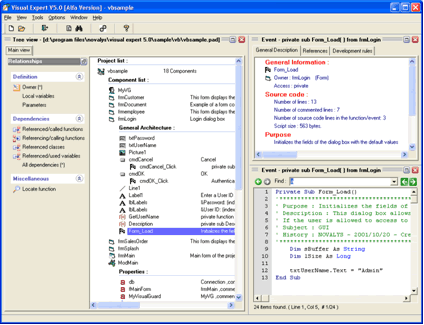
Analysing your project Before you can explore it, Visual Expert will analyse your code. A wizard will help you declare your project and define the list of VB elements you wish to be analysed. You may take the elements one by one or import your complete VB project’s file. I strongly recommend you to use the latter. Visual Expert will then launch your project’s code analysis. You can then almost instantly explore your code in the Graphical Interface. Exploring the codeVisual Expert’s graphical interface has three different parts; a tree view, displaying the structure of the application, a “source code” view and a “detail” view displaying information about the element selected. Visual Expert’s graphical interface has three different parts |
The tree view The tree view allows you to navigate in the structure of
the application: for each item (a method, a form, a property
for example) you can select one or more links (for example:
for a method: the method called or the calling method; for
a form, the list of controls). The source code viewThe source code’s display allows you to navigate in the code of the application directly as you would in an HTML page. The code is coloured and the referenced methods are hyperlinks. |
||
|
||||
If you click on these hyperlinks you will immediately see the method’s code. “Next” and “Previous” buttons enable you to come back to code you have already displayed. This view is very useful to navigate directly in the source code of your application. The « detail » view This view displays information on the element selected in the tree view. This information includes the complete name of the source file, the date of the first modification, the type of components, etc. But you can also find information on the dead code of the application (unused variables, for examples) or again on the quality of the code (see if the naming rules are respected, the use of global variables …). The association of these three views is particularly efficient to navigate in the application. |
It is easy to go from an impact analysis to searching for
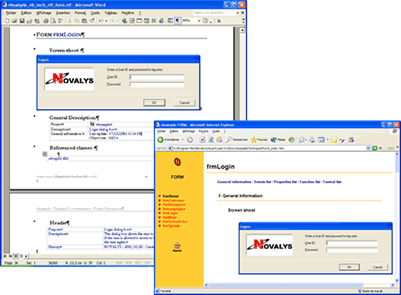
a bug in the code. Generating technical documentation Visual Expert allows you to generate technical documentation on your application. It is possible to generate technical documentation in RTF format (useful for printing) or HTML (useful to transfer the documentation via Internet). The documentation you obtain is pretty complete. |
Not only does
it contain classic information about the elements of your
application (such as the list of controls and methods) but
it also gives you information on referenced or referencing
components. Visual Expert will also display the forms of the
applications and their preview. It is a pity that the screen
shot should be in the BMP format because the pictures are
heavy and non compatible with Netscape. |
||
 |
Visual Expert is a tool which judiciously
completes VB’s features. VB is indeed perfectly conceived
to develop an application but gives little help on the maintenance
aspect. |
|||